
 Share
Share
 Print
Print
|
|
|
|
|


Recurrent Item Authorization Explorer
The Recurrent Item Authorization Explorer is a tool created to allow the monitoring of recurrent items. All items displayed in this program have to be marked as either 'Chronic' or 'Alert' and released for authorization in the Recurrent Items window. Defect Reports items are marked as Chronic or Alert via the Recurrent Items, Optional Tab.
Only Recurrent Items that are marked as Alert or Chronic (or with other categories that have the flag Alert or Chronic set in the System Trans Code) will be displayed in Recurrent Item Authorization Explorer.
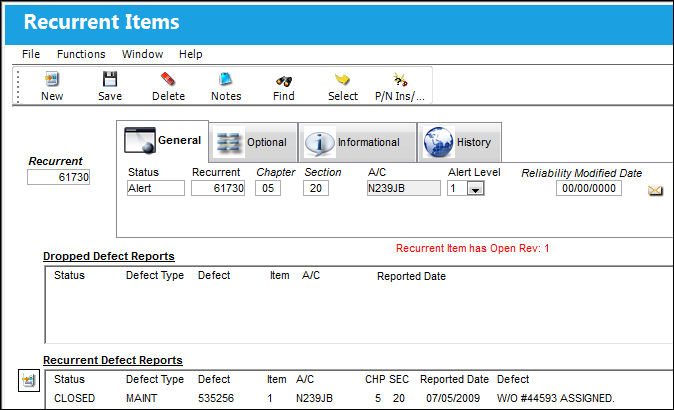
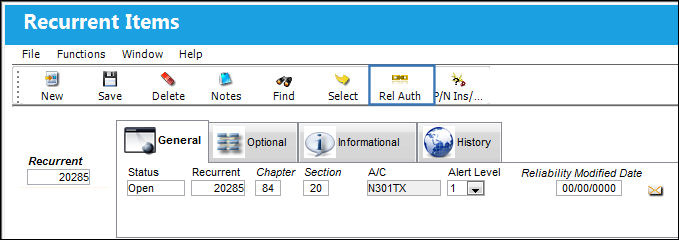
Enter the Recurrent Item number and select the Find  button. Select the Optional tab. Right-click in the Recurrent Category field will open a pop-up window with the three categories available: Advise, Alert and Chronic. Other options can be created in the Recurrent/Category transaction code. Once a Recurrent Category has been assigned and the Save
  button has been clicked, the Release to Authorization
  button will be displayed in the toolbar:
Only Recurrent Items that are marked as Alert or Chronic (or with other categories that have the flag Alert or Chronic set in the System Trans Code) will be displayed in Recurrent Item Authorization Explorer.
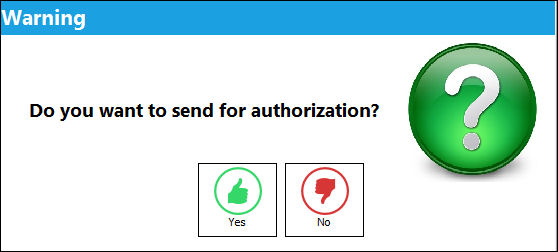
A prompt will ask to confirm the release:
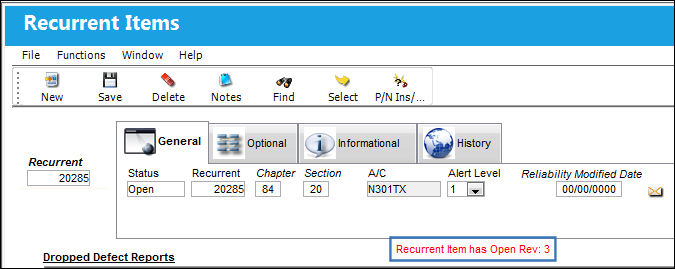
After confirming, the Recurrent Item will show the information that an open Revision is available:
The Recurrent Item will now be displayed in Recurrent Item Authorization Explorer. Go to Reliability / Explorer / Recurrent Item Authorization Explorer:
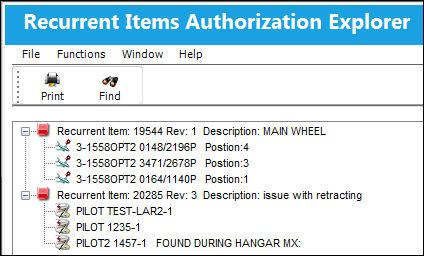
All items displayed here are marked as either Alert (yellow icon) or Chronic (red icon). The items can now be authorized. For more information, refer to the Authorization of Recurrent Items.
Share
Print
|
©1997-2026 Trax USA Corp. All rights reserved. This manual may not be copied, photocopied, reproduced, translated, or converted to any electronic or machine-readable form, in whole or in part, without prior written approval from Trax USA Corp. |
 |