
 Share
Share
 Print
Print
|
|
|
|
|


Creating a New System Transaction Code
To update a Transaction Code or create a new one, click on the code to select it, then right click on the mouse button.
Select from the context menu (New Record or Update Record).
The following window will then appear:
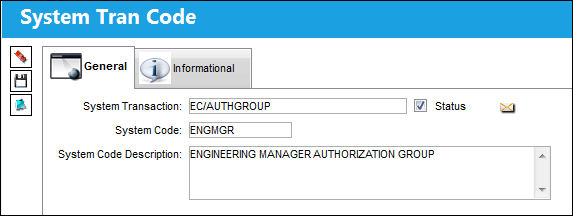
The following information/options are available in this window:
_____________________________________________________________________________________
System Transaction
The selected transaction record.
System Code
Enter a name for the code (maximum 10 characters). It is recommended that you choose a name, abbreviation, or acronym that reflects the function of the group.
System Code Description
Enter a description of the Group or the full name of the group.
_____________________________________________________________________________________
After saving and exiting, the Explorer window should refresh with the changed details visible. Most of the System Tran Codes are set up similarly as described above. Special codes are described in the Special System Transaction Codes Section.
Share
Print
|
©1997-2026 Trax USA Corp. All rights reserved. This manual may not be copied, photocopied, reproduced, translated, or converted to any electronic or machine-readable form, in whole or in part, without prior written approval from Trax USA Corp. |
 |