 Download Online Help
 Print
|
|
|
|
|


Engineering Authorization Management Query
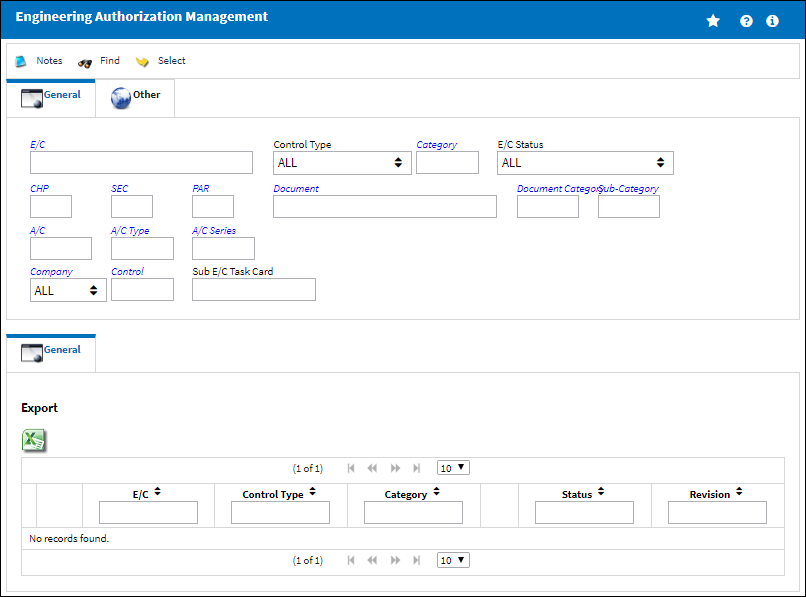
The Engineering Authorization Management Query allows users to view E/Cs that are pending release for authorization and E/Cs that have been released for authorization and pending approval.
Note: For more information on Engineering Control Authorization, refer to the Engineering Authorization Management window.
Query
The following options/information is available in this window:
_________________________________________________________________________
E/C
The Engineering Control that specifies aircraft or component scheduled maintenance intervals.
Control Type
The Engineering Control Type (E/C or Task Card).
Category
The category of the E/C (i.e. AD, SB, CHECK).
E/C Status
Select the status of the E/C from one of the following options:
ALL - All records.
Applicable/Not Embody - The E/C is applicable to an A/C Type/Series or Part Number, but may not be mandatory. This status allows the E/C to be entered in the system, but does not require compliance.
Cancel - The E/C has been cancelled.
N/A - The E/C is not effective to a specific A/C or P/N.
Open - The E/C is Open.
Pending - This is the default status. This will be the status until the E/C is authorized.
Rejected - The E/C was rejected or not authorized and may need to be sent back through the authorization process for revision.
Terminated - The E/C is no longer in use. It has either been complied with for all effective aircraft or components, or the action of another E/C has terminated it. When an E/C is terminated, the termination applies to the entire fleet.
CHP/SEC/PAR
The ATA chapter/section/paragraph, as applicable.
Document
The document reference number associated to the E/C.
Document Category
The document category code for the document reference associated to the E/C.
Sub Category
A Sub Category can be used to further define the E/C Category, if applicable. For example, you may want to classify your ADs for Engines, APUs, and Landing Gear separately. The Sub Category Transaction Code is set up via Settings/ Explorer/ System Transaction Code/ Engineering.
A/C
The individual Aircraft tail number. Enter the aircraft the E/C is effective to.
A/C Type
The aircraft type the E/C is effective to.
A/C Series
The aircraft series the E/C is effective to.
Company
The name of the airline company for which the E/C will be utilized.
Note: For more information, refer to the Multi Company Functionality.
If the Control Type 'Task Card' is selected when querying by Company, no results will appear.
Control
Select a Control Type from the drop down menu to query by:
- A/C
- P/N
The user may also select into the Control field to access the following drop down menu. Here the user may select an aircraft to query for. If the Control Type 'Task Card' is selected when querying by Company, Control or Sub E/C Task Card, no results will appear.
Sub E/C Task Card
Enter the associated Sub E/C Task Card. If the Control Type 'Task Card' is selected when querying by Company, Control or Sub E/C Task Card, no results will appear.
_________________________________________________________________________
Results
The following options/information is available in this window:
_________________________________________________________________________
E/C
The Engineering Control that specifies aircraft or component scheduled maintenance intervals.
Description
The description is the basic title of the E/C. The number of characters is limited in this field and a longer description can be entered in the E/Cs E/C Content Tab.
Control Type
The Engineering Control Type (E/C or Task Card).
Category
The category of the E/C (i.e. AD, SB, CHECK).
Status
The status of the E/C.
Mandatory checkbox
Selected if the classification of the E/C is mandatory.
Revision
The revision can be alpha numeric. When the revision is changed and saved, the system will prompt the user with a revision control record, where the changes made for the specific revision can be saved for auditing purposes. The 'Revised By' field will be automatically updated with the user's user code, and the revision date can be set as required.
By
The user who accepted the Authorization Update Step in the E/C Authorization process.
Date
The date when the Authorization Update Step in the E/C authorization process was completed.
Amendment
The amendment field normally relates to AD amendment numbers. This is alpha numeric and issued by the authority or company issuing the P/N E/C.
Chp/Sec/Par
The ATA chapter/section/paragraph, as applicable.
_________________________________________________________________________
Download Online Help
Print
|
©1997-2018 Trax USA Corp. All rights reserved. This manual may not be copied, photocopied, reproduced, translated, or converted to any electronic or machine-readable form, in whole or in part, without prior written approval from Trax USA Corp. |
 |