 Download Online Help
 Print
|
|
|
|
|


Select the Override  button to apply specific P/N S/N Effectivity if required.
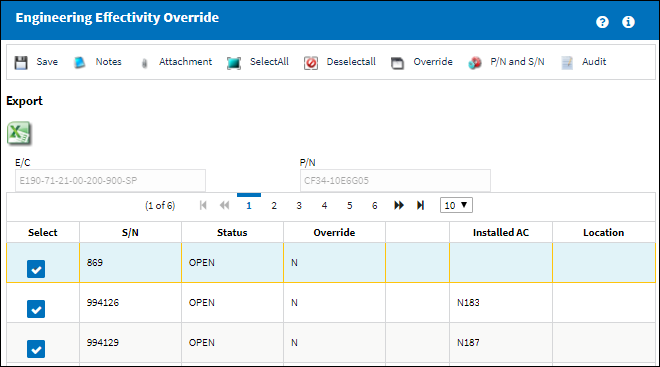
Select Checkbox - Click to make the E/C not Effective against the currently selected P/N S/N.
At default all P/N S/Ns will be selected. If many P/N S/Ns are listed here, select the Select All  button, and then just remove the S/Ns that you do not require by deselecting (un-checking) as necessary.
To view details regarding the currently selected P/N S/N, select the P/N and S/N  button.
To include additional information, select the Notes  and/or Attachment
 buttons. To view past information relating to the record, select the Audit
 button.
Download Online Help
Print
|
©1997-2018 Trax USA Corp. All rights reserved. This manual may not be copied, photocopied, reproduced, translated, or converted to any electronic or machine-readable form, in whole or in part, without prior written approval from Trax USA Corp. |
 |