 Download Online Help
 Print
|
|
|
|
|


Engineering Control Selection, Other Tab
The Engineering Control Selection, Other tab is used to query for E/Cs based on the following search criteria. Enter any of the below search criteria to search for a desired E/C and select the Find  button.
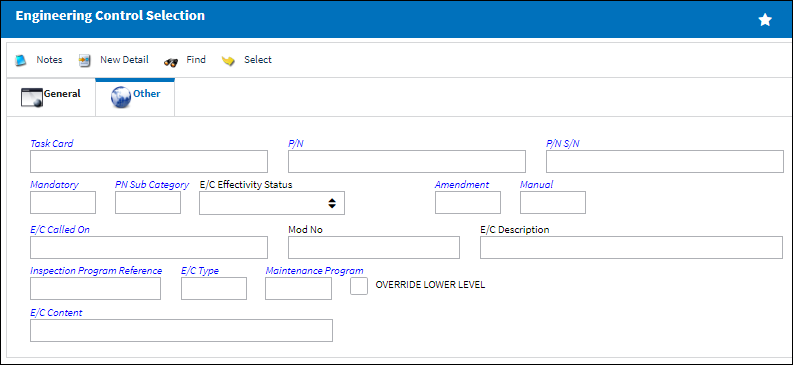
The following options/information is available in this window:
_________________________________________________________________________
Task Card
The Task Card / Job Card that details the scheduled maintenance work.
P/N
The Part Number reference for the aircraft part. This is the Part Number associated to the E/C.
P/N S/N
The Serial Number for the specific serialized part.
Mandatory
Selected if the classification of the E/C is mandatory.
E/C Effectivity Status
The current Effectivity status of the E/C. The options are as follows:
- Open
- Cancel
- Terminated
- Pending
- N/A
- Applicable/Not Embody
E/C Called On
The E/C that the current E/C is calling on for it's schedule.
Mod No.
Modification Numbers for E/Cs. This field is informational only.
E/C Description
The description is the basic title of the E/C. The number of characters is limited in this field and a longer description can be entered in the E/Cs E/C Content Tab.
Installed on A/C
The aircraft that the E/C is installed on.
Amendment
The amendment field normally relates to AD amendment numbers. This is alpha numeric and issued by the authority or company issuing the P/N E/C.
Manual
Related Manual reference to be utilized for the record.
Override Lower Level checkbox
Select to override all lower level E/Cs.
Inspection Program Reference
This field allows users to set a reference for all MPD tasks during the import process.
E/C Type
The Engineering Control Type.
E/C Content
Any E/C Content which provides greater details for the E/C. These are entered in the Engineering Control, E/C Content tab.
_________________________________________________________________________
Download Online Help
Print
|
©1997-2018 Trax USA Corp. All rights reserved. This manual may not be copied, photocopied, reproduced, translated, or converted to any electronic or machine-readable form, in whole or in part, without prior written approval from Trax USA Corp. |
 |