 Download Online Help
 Print
|
|
|
|
|


The Create Task Card from Traxdoc Reference  button allows the user to create Task Cards from a specific TraxDoc of choice. Select or enter the specific TraxDoc Number in the TraxDoc Number field.
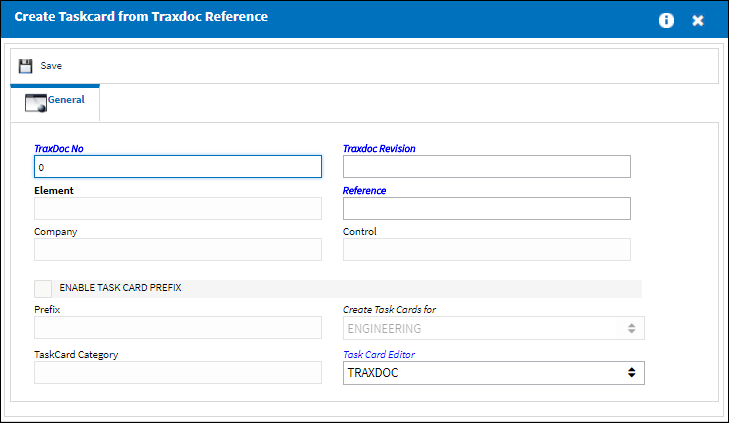
The following options/information is available in this window:
_________________________________________________________________________
TraxDoc No.
The TraxDoc Document ID number, which is automatically generated by the system. Click into the field and select/enter the appropriate TraxDoc number.
Note: This number will auto populate the TraxDoc Revision field and all applicable fields.
Traxdoc Revision
The document’s current revision number. Each TraxDoc can have multiple revisions as the data/records created through the TraxDoc will need to be updated (revised) regularly depending on the requirements of the aircraft manufacturer, regulatory agency, airline, etc.
Element
The type of record that is referenced. This field is not editable and will populate if applicable.
Reference
A reference to a specific section of the SGML manual that was imported through the TraxDoc. Click into the field and select a document to reference.
Company
This field is not editable and will populate if applicable.
Control
A Control Category code that will populate the Zone or Panel located on a specific Type/ Series (if applicable).
Enable Task Card Prefix checkbox
The set prefix provided to the Task Card. This field is not editable and will populate if a prefix has been assigned to all imported Task Cards through the specified TraxDoc (if applicable).
Create Task Cards for
Select the module required to load the SGML Task Card to. This field is not editable and will populate from the Task Card created from the specified TraxDoc (if applicable).
Task Card Category
The Task Card Category that will be associated with each Task Card. This field is not editable and will populate from the Task Card created from the specified TraxDoc (if applicable).
Task Card Editor
Select the editor type (TRAXDOC, TASK CARD). The editor is used to create the content for the Task Cards.
_________________________________________________________________________
Download Online Help
Print
|
©1997-2018 Trax USA Corp. All rights reserved. This manual may not be copied, photocopied, reproduced, translated, or converted to any electronic or machine-readable form, in whole or in part, without prior written approval from Trax USA Corp. |
 |