 Download Online Help
 Print
|
|
|
|
|


If the P/N being returned to stock inventory does not have a warranty, then a No Warranty Info tab will be present.
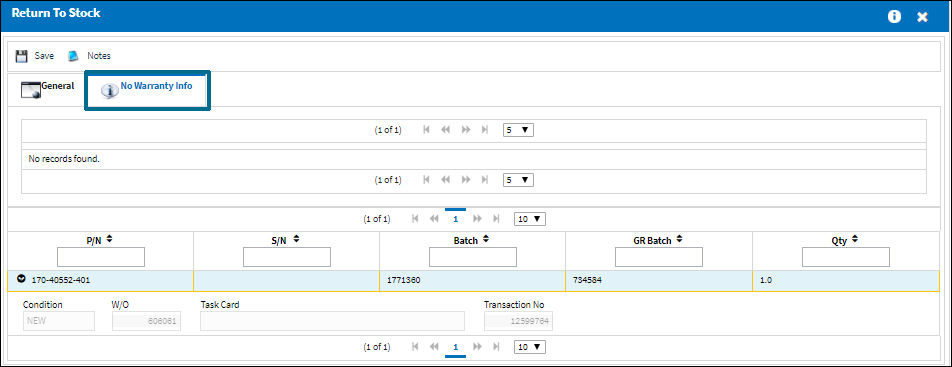
The following options/information is available in this window:
_________________________________________________________________________
P/N
The Part Number reference for the aircraft part.
S/N
The Serial Number for the specific serialized part.
Batch
The batch number that is associated with a part when introduced/received into the system.
GR Batch
The original batch number when the part was initially introduced/received into inventory.
QTY
The quantity of parts for the transaction.
Condition
The condition of the part.
W/O
The Work Order used to categorize, manage, and schedule work requirements for aircraft maintenance.
Task Card
The Task Card / Job Card that details the scheduled maintenance work.
Transaction No
An automatically generated reference number that is assigned to the part number being entered upon save. This transaction number is pulling from P/N Inventory History Next Sequence Number configuration.
_________________________________________________________________________
However, if the P/N does have a warranty, then a Warranty Info tab will be present. For more information, refer to the Warranty Management Process.
Download Online Help
Print
|
©1997-2018 Trax USA Corp. All rights reserved. This manual may not be copied, photocopied, reproduced, translated, or converted to any electronic or machine-readable form, in whole or in part, without prior written approval from Trax USA Corp. |
 |