 Download Online Help
 Print
|
|
|
|
|


Import Button, via P/N Initial Multi Load
The Import  button is used to quickly import parts that belong to a customer or vendor into Inventory. This option allows the vendor to create a digital file listing these parts and related information for the import of parts that are owned by a customer or vendor, but will be managed within the system.
First, the user must prepare the file. For information regarding how to prepare the import file, refer to Preparing File For Import, via the Import Button of the System Standards Training Manual.
Note: Import files saved as .txt (tab delimited), .csv (coma delimited) or .xlsx cannot have spaces in the title of the file. Spaces in the file path will cause errors when importing.
Criteria for Owned P/Ns file:
Column Name |
Data Type |
Limitation |
Path |
Part Number |
Alphanumeric |
35 |
Inventory/ Update/ P/N Initial Multi Load/ General tab |
Serial Number |
Alphanumeric |
20 |
Inventory/ Update/ P/N Initial Multi Load/ General tab |
Description |
Alphanumeric |
50 |
Inventory/ Update/ P/N Initial Multi Load/ General tab |
Qty |
Numeric |
6 |
Inventory/ Update/ P/N Initial Multi Load/ General tab |
Condition |
Alphanumeric |
8 |
Inventory/ Update/ P/N Initial Multi Load/ General tab |
Shelf Life |
Numeric |
8 |
Inventory/ Update/ P/N Initial Multi Load/ General tab |
Stock UOM |
|
|
|
P/N Software |
|
|
|
AWB |
Alphanumeric |
10 |
Inventory/ Update/ P/N Initial Multi Load/ General tab |
The following is displayed:
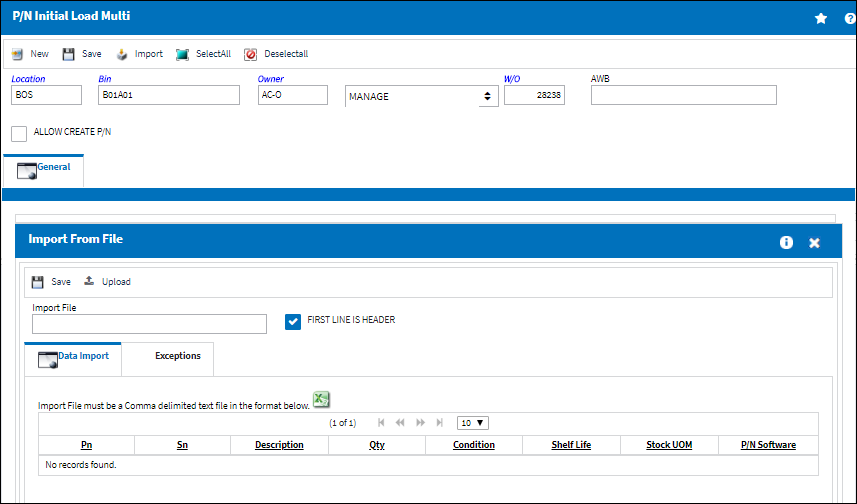
Complete all of the Import steps.
For information regarding how to Import a file, refer to Importing File via Import Button of the System Standards Training Manual.
The sysem displays the P/N Initial Load Multi screen with the newly imported information.
Note: There is no limit to the number of parts that may be added or imported via text file using this option. However, it is best to make sure that as much information about the part is entered for the benefit of later use of the part.
To confirm the part listing in Inventory, go to Inventory/ Update/Inventory Transaction. Enter the P/N in the P/N field and press the Find  button.
The system displays the part, revealing the 'MANAGE' flag.
Download Online Help
Print
|
©1997-2018 Trax USA Corp. All rights reserved. This manual may not be copied, photocopied, reproduced, translated, or converted to any electronic or machine-readable form, in whole or in part, without prior written approval from Trax USA Corp. |
 |