 Download Online Help
 Print
|
|
|
|
|


Owner Master, General Tab
From the Owner Master, General tab, users can create or modify Owners. Go to Settings/ Update/ Owner and either select an existing code or create a new one by clicking on the New  button.
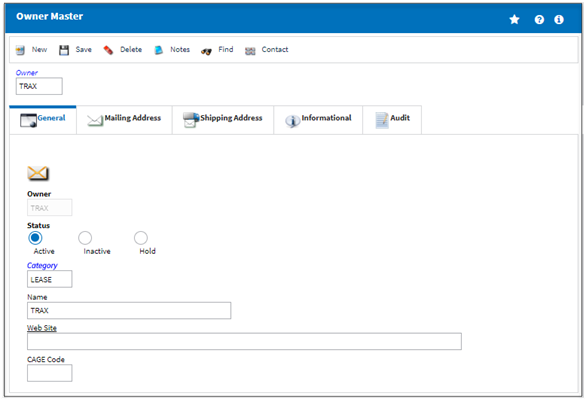
The following options/information is available in this window:
_________________________________________________________________________
Owner
The name of the owner of the part, when applicable.
Status radio buttons
The Current Status (select one of the following radio buttons):
Active - Normal business can be transacted for this owner.
Inactive - This owner is no longer used in the system.
Hold - This owner is on hold pending resolution.
Category
The category of owner as defined and can be set up in the Owner Category Transaction Code.
Name
The name of the owner.
Web Site
The website of the owner.
CAGE Code
Commercial and Government Entity (5 character code, basically like Federal supplier code).
_________________________________________________________________________
Note: The Vendor Master, Owner Master, Customer Master and Employee Master are all part of the same relationship master table, therefore cannot have the same code entered. If the same code is entered the user will receive the following message in the Owner Master:
Error Summary: Already exists.
Select OK to acknowledge the message and exit the prompt.
Download Online Help
Print
|
©1997-2018 Trax USA Corp. All rights reserved. This manual may not be copied, photocopied, reproduced, translated, or converted to any electronic or machine-readable form, in whole or in part, without prior written approval from Trax USA Corp. |
 |