 Download Online Help
 Print
|
|
|
|
|


P/N Master, Optional Tab
Select or create the Part Number and go to the P/N Master, Optional tab.
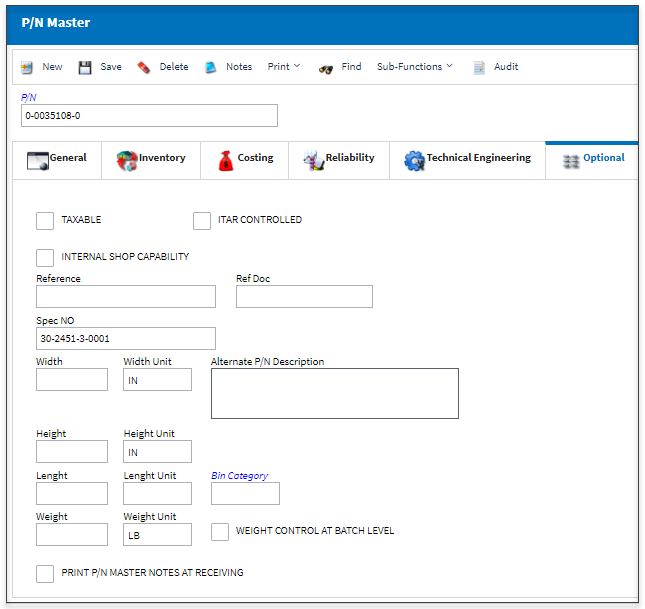
The following options/information is available in this window:
_________________________________________________________________________
Taxable checkbox
Check this to have taxes applied to this part. The percentages that will be applied are set up in Settings/ Update/ Location. Then, when a new Order is created, the taxes for this part will automatically be calculated.
Internal Shop Capability checkbox
Select this checkbox if this part is internal shop (maintenance) capable.
Reference
You may note any reference information here.
Ref Doc
You may note a document to be referenced here.
Spec NO.
The spec number for the part.
Width
Enter the appropriate dimension information regarding this part. Unit information may also be entered.
Height
Enter the appropriate dimension information regarding this part. Unit information may also be entered.
Length
Enter the appropriate dimension information regarding this part. Unit information may also be entered.
Weight
Enter the appropriate dimension information regarding this part. Unit information may also be entered.
Unit
The unit of measure.
Alternate P/N Description
Enter an alternate P/N Description from the one in the P/N Master, General tab.
Bin Category
The bin category code.This information can be set up via Settings/ Explorer/ System Transaction Codes/ Settings/ Bin Category.
Weight Control at Batch Level checkbox
Click this checkbox if there is to be Weight Control at the Batch level.
Print P/N Master Notes at Receiving checkbox
Click this checkbox if the P/N Master Notes are to be printed at Receiving.
_________________________________________________________________________
Download Online Help
Print
|
©1997-2018 Trax USA Corp. All rights reserved. This manual may not be copied, photocopied, reproduced, translated, or converted to any electronic or machine-readable form, in whole or in part, without prior written approval from Trax USA Corp. |
 |