 Download Online Help
 Print
|
|
|
|
|


The P/N Interchangeability, Reliability tab allows the user to enter the following information:
 The P/N Interchangeability, Reliability tab is security controlled via Settings/ Update/ P/N/ P/N Interchangeable Reliability. The tab and the information within the tab will always be visible, however, if security is enabled, all fields will be greyed out and the user will not be able to update the information within the tab. For additional information, refer to the Security Explorer via the System Administration Training Manual.
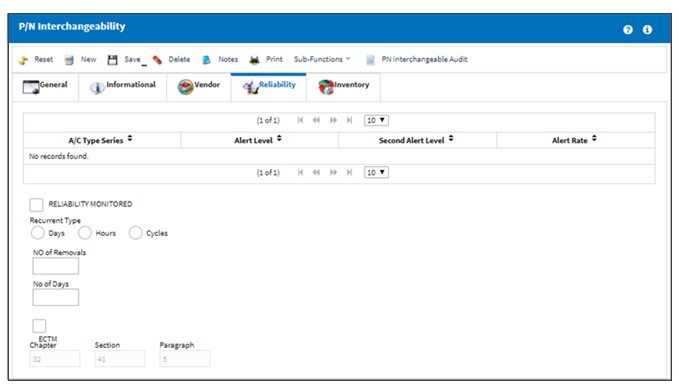
The following options/information is available in this window:
_________________________________________________________________________
Chapter / Section / Paragraph
The ATA chapter/section/paragraph, as applicable.
A/C Type/Series
The aircraft Type and Series / Fleet assignment.
Alert Level
Enter the actual alert level for the A/C Type/Series for the P/N. This may be provided by the A/C manufacturer or can be an organizational standard. P/N Reliability alert level is not required, but will allow alert levels to be shown on various prints. Make sure the Alert level can be applied to the A/C Type-Series indicated in preceding field.
Second Alert Level
Enter the second alert level for the A/C Type/Series for the P/N. P/N Reliability alert level is not required, but will allow alert levels to be shown on various prints. Make sure the Second Alert level can be applied to the A/C Type-Series indicated in preceding field.
_________________________________________________________________________
Download Online Help
Print
|
©1997-2018 Trax USA Corp. All rights reserved. This manual may not be copied, photocopied, reproduced, translated, or converted to any electronic or machine-readable form, in whole or in part, without prior written approval from Trax USA Corp. |
 |