 Download Online Help
 Print
|
|
|
|
|


From the Warranty tab of the Vendor P/N Information window, the following is displayed.
To setup new vendor warranty information for the part number, enter the values in the following fields:
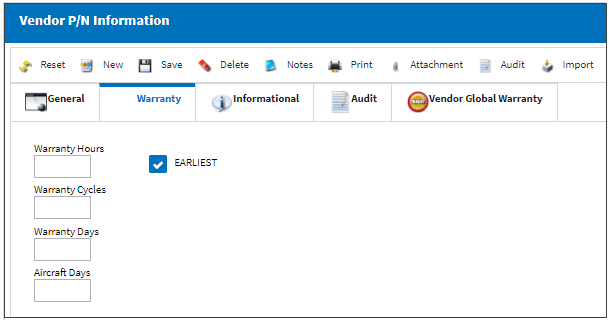
The following options/information is available in this window:
_________________________________________________________________________
Warranty Hours / Cycles / Days
The number of Warranty A/C flight hours related to this part. The number of Warranty A/C cycles related to this part. The number of Warranty A/C days related to this part.
Aircraft Days
The number of Warranty aircraft installed days related to this part.
Earliest checkbox
- If the Warranty Hours, Cycles, and Days fields are filled, checking the Earliest checkbox will make the warranty become due at whichever time comes first.
- If the Warranty Hours, Cycles, and Days fields are filled, de-selecting the Earliest checkbox will make warranty due for the latest schedule occurrence.
Note: This checkbox may be defined per vendor on the Vendor Master, Warranty Information Tab.
_________________________________________________________________________
Download Online Help
Print
|
©1997-2018 Trax USA Corp. All rights reserved. This manual may not be copied, photocopied, reproduced, translated, or converted to any electronic or machine-readable form, in whole or in part, without prior written approval from Trax USA Corp. |
 |