 Download Online Help
 Print
|
|
|
|
|


From the Vendor P/N Information window, select the Import  button for the quick import of many records (instead of manually entering) into the R/O Capability window.
Note: Before importing a file, it must be formatted in text-delimited (.txt) format. Otherwise, the system will not be able to process the file's information and display it correctly within this window. The file to be imported must exist somewhere on a stored or shared drive, it must be in text delimited format, and it must contain information that is organized according to the window above, by designated fields. If the first line of the text delimited file is a header, then the related checkbox in the above screen must be selected. In this way, the system will separate the data from the header information. Import files saved as .txt (tab delimited), .csv (coma delimited) or .xlsx cannot have spaces in the title of the file. Spaces in the file path will cause errors when importing.
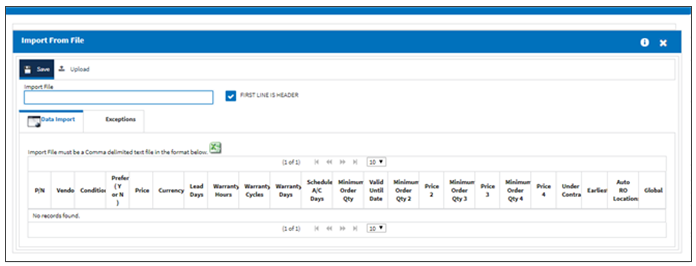
Enter/update the following information. The following table lists the fields (left to right) in the above import window:
_________________________________________________________________________
Import File
The file to be imported must be Tab delimited. Individual records that will be imported must contain a Location/Site that matches the location that is currently selected.
First Line is Header
Check to indicate that the first line in the Tab delimited text file represents a Header line and should not be imported.
P/N
The Part Number reference for the aircraft part.
Type (V or L)
Vendor or Location (V or L).
Vendor/Location
The system code for the service/part provider. The Location for maintenance events, inventory stores, orders, transactions, or training events.
Site
The site where the work should be carried out (if applicable).
Condition
The condition of the part.
Prefer (Y or N)
Preferred vendor (Yes or No).
Price
Part number price.
Currency
Currency in which price has been set.
Lead Days
Number of lead days.
Warranty Hours
Number of hours that covers repair process.
Warranty Cycles
Number of cycles that covers repair process.
Warranty Days
Number of days that covers repair process.
Schedule A/C Days
Number of days installed on A/C (under the warranty).
Minimum Order QTY
Minimum number of parts required per order.
Valid Until Date
Date until which vendor is able to retain part cost.
Minimum Order QTY 2
Minimum number of parts required per order.
Price 2
Part number price (total price for total units ordered).
Minimum Order QTY 3
Minimum number of parts required per order.
Price 3
Part number price (total price for total units ordered).
Minimum Order QTY 4
Minimum number of parts required per order.
Price 4
Part number price (total price for total units ordered).
Location
Location origin for prices.
Earliest
Whichever schedule parameters happens first.
Under Contract (Yes or No)
Yes or No if vendor is under contract for repair of designated parts.
_________________________________________________________________________
Select the Browse  button to browse your computer for the file to be imported.
Once the file is specified, and appears in the Import File field click on the Import button.
The records appearing in the text file will appear in the Data Import Tab of the window.
Note: Data that could not be processed will appear on the Exceptions Tab.
Download Online Help
Print
|
©1997-2018 Trax USA Corp. All rights reserved. This manual may not be copied, photocopied, reproduced, translated, or converted to any electronic or machine-readable form, in whole or in part, without prior written approval from Trax USA Corp. |
 |