 Download Online Help
 Print
|
|
|
|
|


The Import  button, via the P/N Sell window is used to quickly import P/N Sell information for various parts and their Conditions.
This import file is also known as the Catalog List Price (CLP). Multiple files can be imported; if an entry for a part/condition already exists, then the newer entry will override the older entry. The Catalog List Price typically focuses on parts in 'New' Condition.
To begin the import, users must first prepare the file. For information regarding how to prepare the import file, refer to Preparing File For Import, via the Import Button of the System Standards Training Manual.
Note: Import files saved as .txt (tab delimited), .csv (coma delimited) or .xlsx cannot have spaces in the title of the file. Spaces in the file path will cause errors when importing.
Criteria for the P/N Sell Import file:
Column Name |
Data Type |
Limitation |
Path |
P/N |
Alphanumeric |
35 |
Settings/ Update/ P/N Master/ Sell button, General tab |
Condition |
Alphanumeric |
8 |
Settings/ Update/ P/N Master/ Sell button, General tab |
Effective Date |
Numeric |
8 |
Settings/ Update/ P/N Master/ Sell button, General tab |
Unit Sell Price |
Numeric |
11 |
Settings/ Update/ P/N Master/ Sell button, General tab |
Percentage Markup |
Numeric |
5 |
Settings/ Update/ P/N Master/ Sell button, General tab |
Unit Sell Currency |
Numeric |
11 |
Settings/ Update/ P/N Master/ Sell button, General tab |
Currency |
Alphanumeric |
10 |
Settings/ Update/ P/N Master/ Sell button, General tab |
Currency Exchange Rate |
Numeric |
14 |
Settings/ Update/ P/N Master/ Sell button, General tab |
Warranty Hours |
Numeric |
5 |
Settings/ Update/ P/N Master/ Sell button, Warranty tab |
Warranty Cycles |
Numeric |
5 |
Settings/ Update/ P/N Master/ Sell button, Warranty tab |
Warranty Days |
Numeric |
5 |
Settings/ Update/ P/N Master/ Sell button, Warranty tab |
Schedule A/C Days |
Numeric |
5 |
Settings/ Update/ P/N Master/ Sell button, Warranty tab |
Earliest checkbox |
N/A |
Y/N |
Settings/ Update/ P/N Master/ Sell button, Warranty tab |
Select the Import button for the quick import of many records (instead of manually entering) into the P/N Sell window.
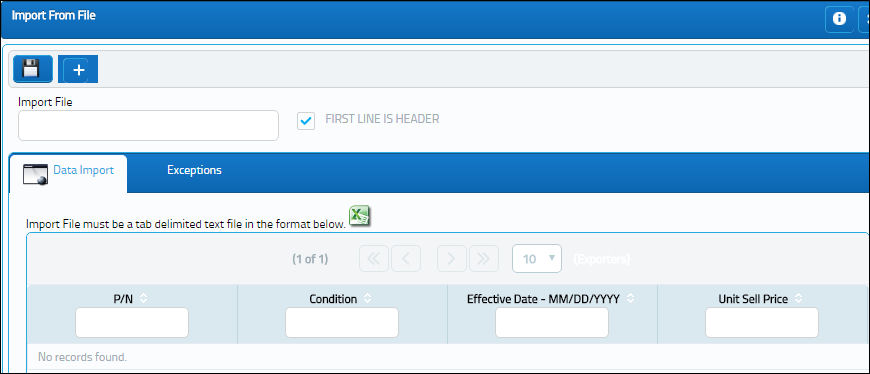
The following options/information is available in this window:
_________________________________________________________________________
Import File
The file to be imported must be Tab delimited. Individual records that will be imported must contain a Location/Site that matches the location that is currently selected.
First Line Is Header checkbox
Check to indicate that the first line in the Tab delimited text file represents a Header line and should not be imported.
_________________________________________________________________________
Select the Browse  button to browse your computer for the file to be imported.
Once the file is specified and it appears in the Import File field, select the Import button. The records from the text file will appear in the Data Import tab of the window.
Note: Data that could not be processed will appear on the Exceptions Tab.
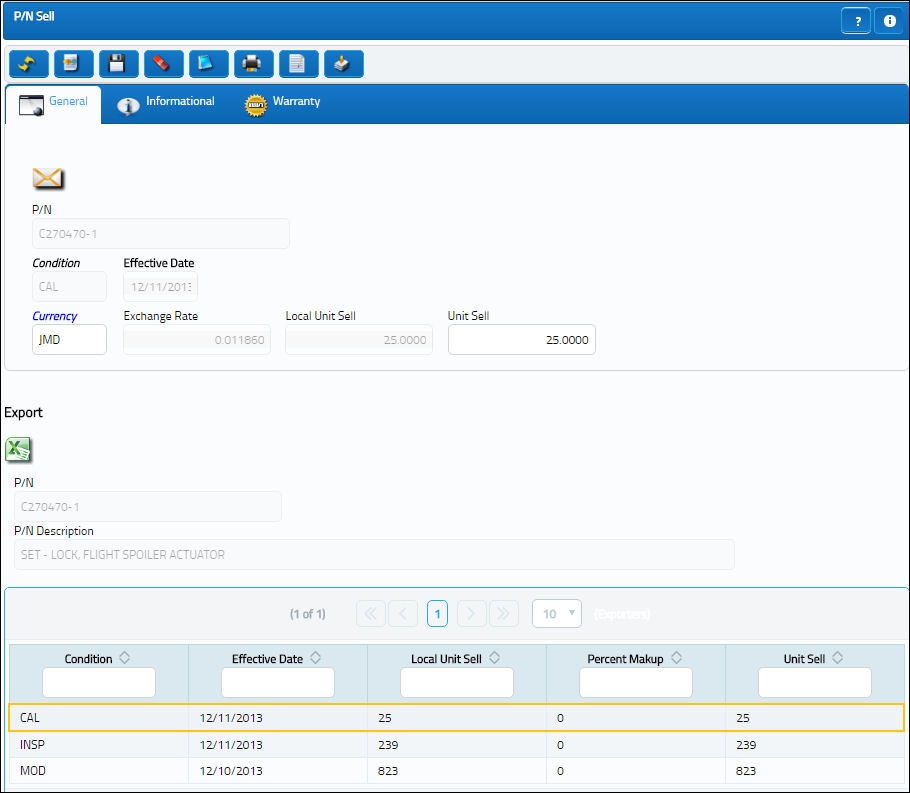
Exit the Import From File window. Imported records will appear as shown below in the P/N Sell window. Keep in mind that records for multiple parts can be imported through the same import.
Download Online Help
Print
|
©1997-2018 Trax USA Corp. All rights reserved. This manual may not be copied, photocopied, reproduced, translated, or converted to any electronic or machine-readable form, in whole or in part, without prior written approval from Trax USA Corp. |
 |