 Download Online Help
 Print
|
|
|
|
|


The Vendor P/N Repair Capability, Vendor Global Warranty tab is informational only. This information is populated from the Vendor Master Warranty tab.
The Vendor Global Warranty tab will only populate if the specified vendor, entered in the General tab of the Vendor P/N Repair Capability window, has warranty setup. This allows the user the option of using the current vendor warranty or overriding the vendor warranty with new warranty information for that specified part number which can be setup in the Warranty tab of the Vendor P/N Repair Capability window.
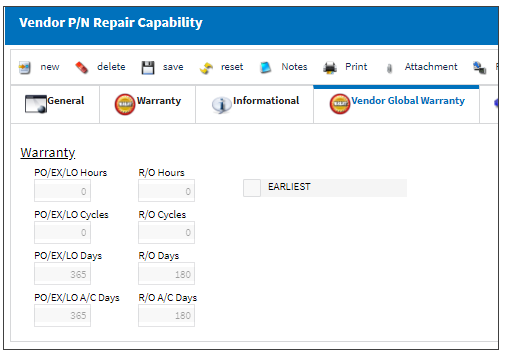
The following options/information is available in this window:
_________________________________________________________________________
Warranty PO/EX/LO Hours
Number of default hours for a PO/EX/LO.
Warranty RO Hours
Number of default hours for a RO.
Warranty PO/EX/LO Cycles
Number of default cycles for a PO/EX/LO.
Warranty RO Cycles
Number of default cycles for a RO.
Warranty PO/EX/LO Days
Number of default days for a PO/EX/LO.
Warranty RO Days
Number of default days for a RO.
Warranty PO/EX/LO A/C Days
Number of default A/C days for a PO/EX/LO.
Warranty RO A/C Days
Number of default A/C days for a RO.
Earliest checkbox
If selected, the first warranty limit will close the warranty. If de-selected, the warranty will remain open until all warranty limits are met.
Note: This checkbox may be defined per vendor on the Vendor Master, Warranty Information Tab.
_________________________________________________________________________
Download Online Help
Print
|
©1997-2018 Trax USA Corp. All rights reserved. This manual may not be copied, photocopied, reproduced, translated, or converted to any electronic or machine-readable form, in whole or in part, without prior written approval from Trax USA Corp. |
 |