 Download Online Help
 Print
|
|
|
|
|


P/N Software Configuration Authorization, General Tab
The P/N Software Configuration Authorization, General tab allows the user additional functionality via the various buttons available. The user also has the option of changing the status if the authorization of a configuration via the General tab.
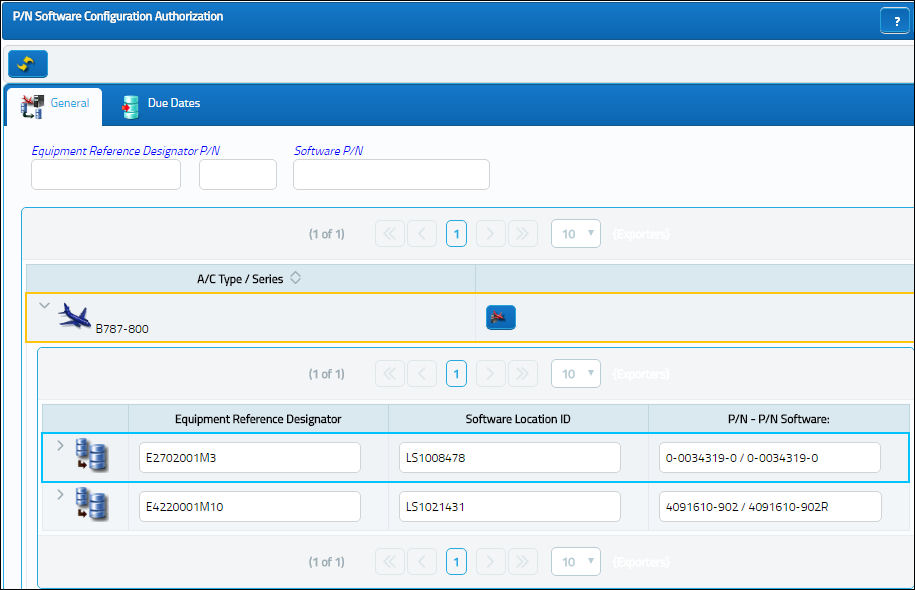
The following options/information is available in this window:
_________________________________________________________________________
A/C Type/Series
The aircraft Type and Series / Fleet assignment.
P/N Software Configuration On A/C  button
Select the P/N Software Configuration On A/C button to view uploaded configuration on a specified aircraft. For additional information, refer to the P/N Software Configuration On A/C Button, via P/N Software Configuration.
Equipment Reference Designator
The Aircraft Position ERD (Equipment Reference Designator) reference. This is the physical position on the aircraft where the hardware part is installed. This field is part of the 787Software program used to define the ERD for software parts.
Software Location ID
The Software Location Identification (SLID) code. The SLID is where the software for the part is loaded onto the hardware part's ERD location. One ERD may have multiple SLIDs as a hardware part may have multiple software components.
P/N
The Part Number reference for the aircraft part.
P/N Software
The software part that is installed on the aircraft for the hardware part.
Revision
The revision of the P/N Software Configuration.
Description
The description of the part number software.
Override checkbox
When this checkbox is selected, it indicates that the P/N Software Configuration is only effective to some aircraft. When it is deselected, it indicates that the P/N Software Configuration is effective to all aircraft. This checkbox is informational only and cannot be selected/deselected in this window.
E/C to Upload P/N Software Configuration at Compliance  button
When a P/N Software Configuration is in revision, the user may select this the E/C to Upload P/N Software Configuration at Compliance button to view all E/Cs associated to the configuration. The user may select which E/C(s) may upload a P/N Software Configuration upon compliance. For additional information, refer to the P/N Software to Upload at Compliance Button, via Engineering Controls Button, via the Engineering - E/C Training Manual.
Release for Authorization  icon
This icon indicates that the P/N Software Configuration has not yet been released for authorization.
_________________________________________________________________________
Authorization:
The following options/information is available in this window:
_________________________________________________________________________
Authorization
The authorization status of the P/N Software Configuration. Select from one of the following authorization statuses:
- Accepted
- Pending
- Rejected
- Canceled
 This field is security controlled via Security Explorer/ Settings/ Update/ P/N Software Configuration Authorization/ P/N Software Configuration Allow Authorization. For additional information, refer to the Security Explorer via the System Administration Training Manual.
Authorized By
The user who authorized the record.
Authorized Date
The date the record was authorized.
Released for Authorization On
The date and time the P/N Software Configuration was released for authorization.
_________________________________________________________________________
Informational:
The following options/information is available in this window:
_________________________________________________________________________
Created By
The user who created the record.
Created Date
The date the record was created.
Modified By
The user who last modified the record.
Modified Date
The date the record was last modified.
_________________________________________________________________________
Download Online Help
Print
|
©1997-2018 Trax USA Corp. All rights reserved. This manual may not be copied, photocopied, reproduced, translated, or converted to any electronic or machine-readable form, in whole or in part, without prior written approval from Trax USA Corp. |
 |