 Download Online Help
 Print
|
|
|
|
|


The warranty schedule for a part can be in the form of hours, cycles, days, or A/C days. Default warranty schedule information for the part is set up via the Settings/Update/Vendor/Warranty Information tab. The warranty schedule information can be overridden here as required. The actual warranty information is based upon the accumulation of the actuals' A/C flight hours, cycles, and A/C installed days. The warranty actuals' information can also be overridden here as required.
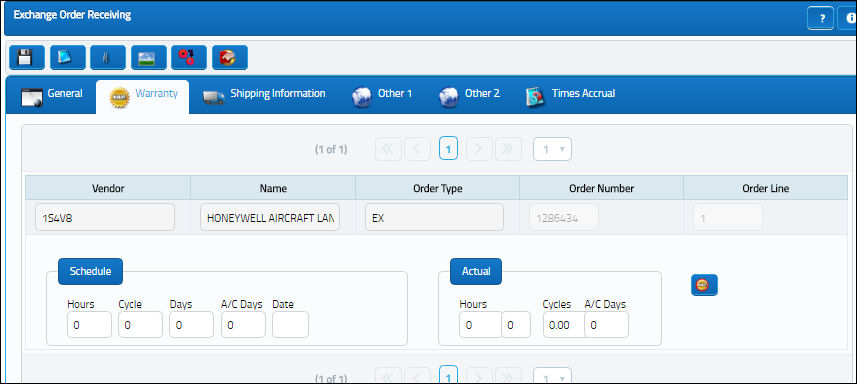
Note: The above example of the Order Receiving Detail is that of a Purchase Order. However, all order types contain the same fields and tabs when being received, with the exception of Repair Orders. For details on the receiving of a R/O, refer to Repair Order Receiving.
The following options/information is available in this window:
_________________________________________________________________________
Vendor
The system code for the service/part provider.
Order
The type of order and the order number for the transaction.
Line
The specific Line item of the Order. Each Line item could represent a different part included in the same order.
Schedule
The vendor or manufacturer provided limits for the warranty.
Schedule Hours
Number of scheduled hours for the part to be installed on an aircraft.
Schedule Cycles
Number of scheduled cycles for the part to be installed on an aircraft.
Schedule Days
Number of scheduled calendar days will be counted for the warranty schedule instead of installed days.
Schedule A/C Days
The installed A/C days warranty for the part.
Schedule Date
The warranty expiration date for the part.
Actual
The warranty actual information is based upon the accumulation of the A/C flight hours, cycles, and A/C installed days actuals. The warranty actual information can be overridden here as required.
Actual Hours
Actual hours installed on an aircraft.
Actual Cycles
Actual cycles installed on an aircraft.
Actual A/C Days
Actual days installed on an aircraft.
_________________________________________________________________________
Download Online Help
Print
|
©1997-2018 Trax USA Corp. All rights reserved. This manual may not be copied, photocopied, reproduced, translated, or converted to any electronic or machine-readable form, in whole or in part, without prior written approval from Trax USA Corp. |
 |