 Download Online Help
 Print
|
|
|
|
|


Training Course Completion, General Tab
First, locate the employee whose Completion status must be changed.
As with the majority of the query selections on the system, it is better to select as many parameters as required to minimize your search result.
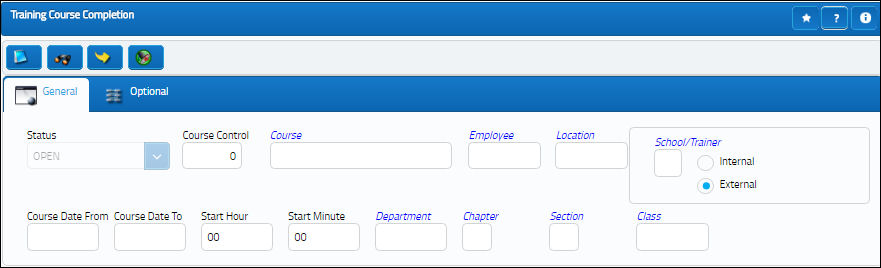
The following options/information is available in this window:
_________________________________________________________________________
Status
Upon initial set up of a class, select ‘Open.' The class will automatically go to ‘Closed’ status once all the employees who are enrolled have completed the course.
Training Course Control
The identification number or name of the course. This number is automatically generated upon saving the record.
Training Course
Choose from the list of previously created Training Courses (that were created via the Training Course Registration option). Use the drop list within the drop down selection to narrow your search parameters. Once you have filled the field with a valid previously created Training Course, most of the fields will automatically fill with the related information. To customize this particular class, you can edit most of the fields as desired.
Employee
The employee registered/enrolled in the course.
Location
The Location for maintenance events, inventory stores, orders, transactions, or training events.
School/Trainer
The person/entity conducting the Training Course.
Course Date (From - To)
The start/end date of the course.
Course Start (Hour/Minute)
The start time of the course.
Department
Select the Department transaction code.
Chapter / Section
ATA Chapter and Section reference.
Class
Select the Enrollment Program.
_________________________________________________________________________
Once you have selected the criteria, click on the Find  button. Your search result will appear.
Download Online Help
Print
|
©1997-2018 Trax USA Corp. All rights reserved. This manual may not be copied, photocopied, reproduced, translated, or converted to any electronic or machine-readable form, in whole or in part, without prior written approval from Trax USA Corp. |
 |