 Download Online Help
 Print
|
|
|
|
|


The Status All  button is used to change the Status of ALL Task Cards in the Work Order if a user does not want to update each individual Task Card when completed. This option allows for a gives a quick solution to close all Task Cards in a Work Order without having to do each one separately.
Note: If the user does not want to update each individual Task Card when completed, the status of the Work Order cannot be changed to Completed until every Task Card has been closed (or deferred).
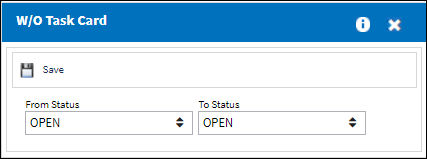
From the T/C Work window, click on the Status All button. The following window will appear. Select from the the From Status and To Status from the drop menu. If the closed status is selected, the user will be required to select a closed date.
Note: Task Cards cannot be re-Opened once the associated W/O Engineering Control has been reset. However, Non-Routine Task Cards can be re-opened if the W/O E/C has been reset.
Populate the Completion Date/Hour/Minute field and select the Close W/O  icon and Save in order to close the Work Order along with the Task Card(s).
Download Online Help
Print
|
©1997-2018 Trax USA Corp. All rights reserved. This manual may not be copied, photocopied, reproduced, translated, or converted to any electronic or machine-readable form, in whole or in part, without prior written approval from Trax USA Corp. |
 |