 Download Online Help
 Print
|
|
|
|
|


W/O Post Completion, Other 1 Tab
The W/O Post Completion, Other 1 tab contains the following search fields.
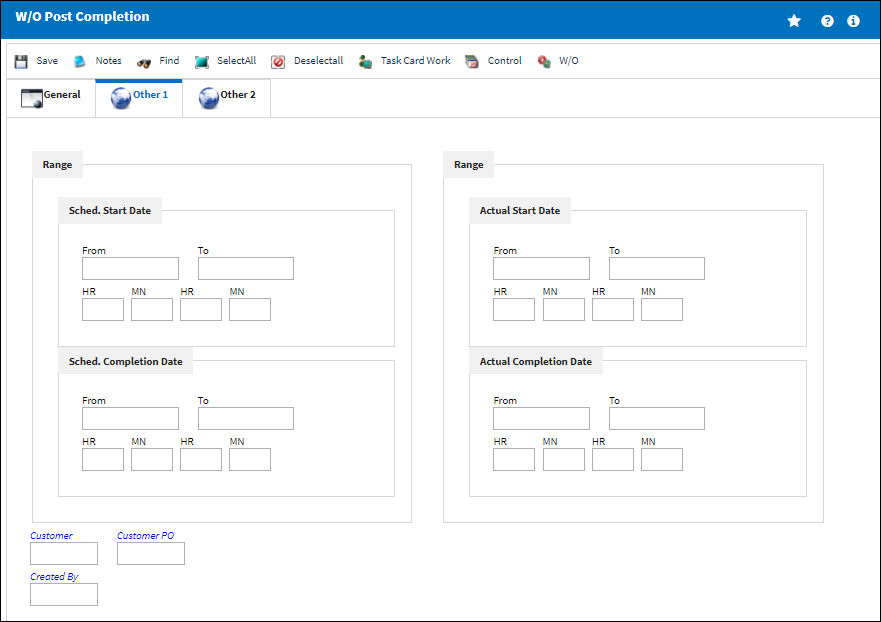
The following options/information is available in this window:
_________________________________________________________________________
Schedule Start Date (From-To)
The scheduled (From-To range) start date.
Schedule Start Hour/Minute (From-To)
The scheduled (From-To range) start hour and minute.
Schedule Completion Date (From-To)
The scheduled (From-To range) completion date.
Schedule Completion Hour/Minute (From-To)
The scheduled (From-To range) completion hour and minute.
Actual Start Date (From-To)
The actual (From-To range) start date.
Actual Start Hour/Minute (From-To)
The actual (From-To range) start hour and minute.
Actual Completion Date (From-To)
The actual (From-To range) completion date.
Actual Completion Hour/Minute (From-To)
The actual (From-To range) completion hour and minute.
Customer
The customer for whom the Work Order was created. This field is also available on the Work Order, General tab. If the Customer field is populated in the Shop W/O Post Completion, General tab, the system will not allow the user to utilize this field in the Shop W/O Post Completion, Other 1 tab.
Customer P.O.
For Third Party purchase, if purchase is on behalf of a customer the PO number may be entered here. Additional Use - if a Sales Order is generated in the system for the service requirement, it may cross reference here as well. This is to be defined by the company procedures. This does not invoice or charge the customer for any service provided. It is only used as a reference number.
Created By
The user who created the record.
_________________________________________________________________________
For more details refer to the W/O Closing Post Completion window.
Download Online Help
Print
|
©1997-2018 Trax USA Corp. All rights reserved. This manual may not be copied, photocopied, reproduced, translated, or converted to any electronic or machine-readable form, in whole or in part, without prior written approval from Trax USA Corp. |
 |