 Download Online Help
 Print
|
|
|
|
|


In order to create a new record select the New  button and fill all mandatory fields as well as all optional fields you want to populate.
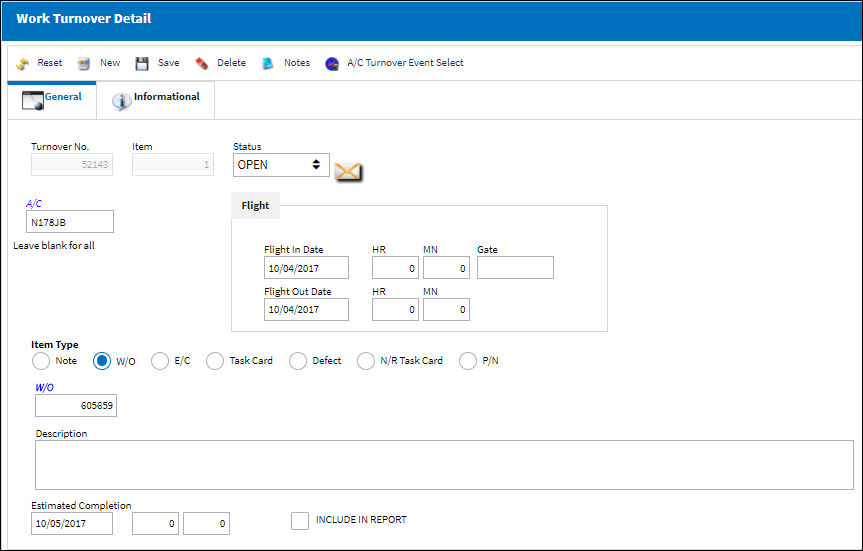
The following options/information is available in this window:
_________________________________________________________________________
A/C
The individual Aircraft tail number. Leave blank if the work turnover record is for all aircraft at the selected location.
Flight In/Flight Out
Arrival and departure time of the aircraft.
Gate
The gate that the aircraft is at.
Item Type radio button
The type of record being created:
Note - A written note to the next shift leader, not associated with any work order or E/C.
W/O - The Work Order used to categorize, manage, and schedule work requirements for aircraft maintenance.
E/C - The Engineering Control that specifies aircraft or component scheduled maintenance intervals.
Task Card - The Task Card / Job Card that details the scheduled maintenance work.
Defect - The defect number (or log book number).
N/R Task Card - The Non-Routine Task Card that details non-scheduled maintenance work / findings.
Note: This option is only functional in the Production Control app.
P/N - The Part Number reference for the aircraft part.
Note: This option is only functional in the Production Control app.
W/O
The Work Order used to categorize, manage, and schedule work requirements for aircraft maintenance.
Description
A description or note to summarize the record type created.
Note: For each type, the Description-field is available. Only for a Note, it is mandatory.
Estimated Completion Date/Time
Estimated Completion Date/Time of the Work Order.
Include in Report
When this checkbox is selected, the information from the Work Over Turnover is included in the Production Control print.
Note: This print is only available via the Production Control app.
_________________________________________________________________________
Download Online Help
Print
|
©1997-2018 Trax USA Corp. All rights reserved. This manual may not be copied, photocopied, reproduced, translated, or converted to any electronic or machine-readable form, in whole or in part, without prior written approval from Trax USA Corp. |
 |