 Download Online Help
 Print
|
|
|
|
|


A/C Flight Schedule Detail, General Tab
From the A/C Flight Schedule, General tab enter/modify a new flight schedule's primary details (such as Origin/Destination, Aircraft, etc.).
Populate all mandatory and desired fields and select the save the record.
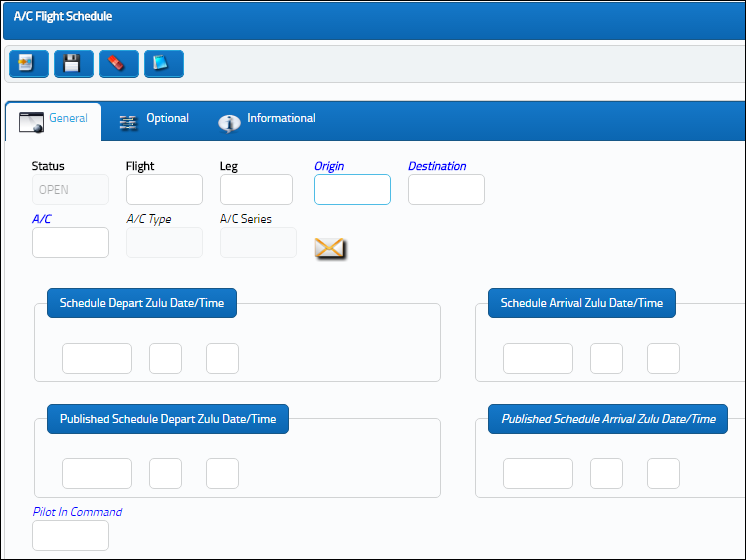
The following options/information is available in this window:
_________________________________________________________________________
Status
The Status of the flight.
Flight
The flight reference number/information.
Leg
The Flight Leg number for the flight.
Origin
The airport of Origin for the flight. Select into this field to access a drop down of available routes as entered in Settings/Update/Routes. If a route is entered that is not known to the system, a message will pop up, the route can nevertheless be used. For routes that are entered into the system, the system will compare actual flight duration with the entered duration.
Destination
The airport of destination for the flight.
A/C
The individual Aircraft tail number.
A/C Type/Series
The aircraft Type and Series / Fleet assignment.
Schedule Depart Zulu Date/Time
The scheduled departure date and time (Zulu).
Schedule Arrival Zulu Date/Time
The scheduled arrival date and time (Zulu).
Published Schedule Depart Zulu Date/Time
The published scheduled departure date and time (Zulu).
Published Schedule Arrival Zulu Date/Time
The published scheduled arrival date and time (Zulu).
Pilot In Command (PIC)
The scheduled pilot for this flight.
_________________________________________________________________________
Download Online Help
Print
|
©1997-2018 Trax USA Corp. All rights reserved. This manual may not be copied, photocopied, reproduced, translated, or converted to any electronic or machine-readable form, in whole or in part, without prior written approval from Trax USA Corp. |
 |