 Download Online Help
 Print
|
|
|
|
|


Defect Report, Resolution Tab
The following tab can be used to query for a defect report by selecting any of the below search criteria. Enter search criteria in one or more of the following fields and select the Find  button.
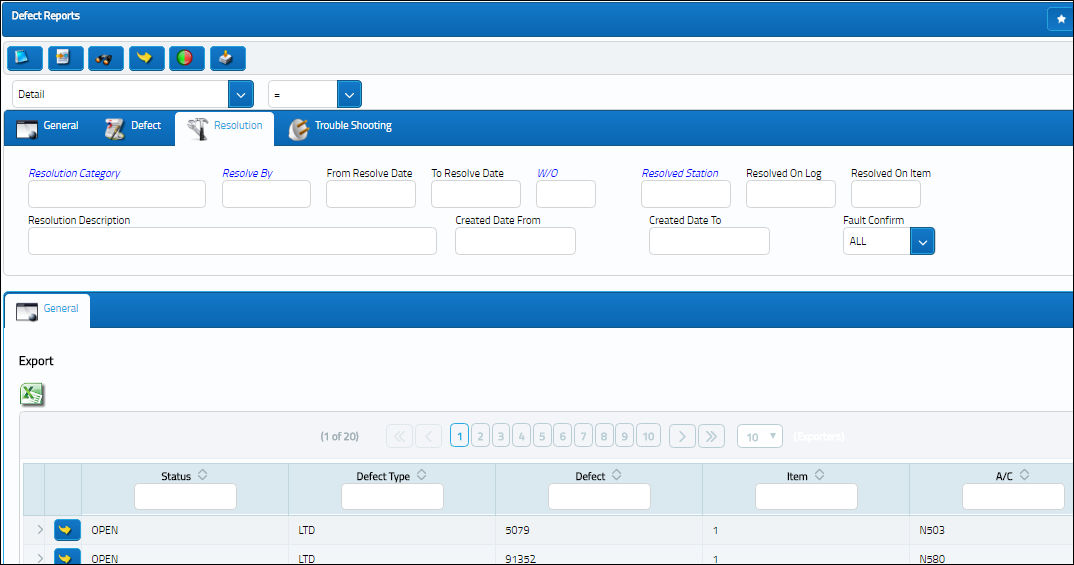
The following options/information is available in this window:
_________________________________________________________________________
Resolution Category
The Resolution category. Select into this field to access a drop down window of pre-defined Resolution Category codes.
Resolve By
The employee who resolved the defect.
From-To Resolve Date
The From-To date range that the record was resolved.
W/O
The Work Order used to categorize, manage, and schedule work requirements for aircraft maintenance.
Resolved Station
The station where the defect was resolved.
Resolved On
The log related to the resolution.
Log Item
The item on the log related to the resolution.
Resolved Description
The description of the resolution of the defect item.
Created Date From-To
The From-To date range that the record was created.
Fault Confirm drop down
Select from one of the following Fault Confirm status':
- All
- Confirmed
- Not Confirmed
- Pending
_________________________________________________________________________
Click the Select  button to view the Defect Report Detail for the selected record.
Download Online Help
Print
|
©1997-2018 Trax USA Corp. All rights reserved. This manual may not be copied, photocopied, reproduced, translated, or converted to any electronic or machine-readable form, in whole or in part, without prior written approval from Trax USA Corp. |
 |