 Download Online Help
 Print
|
|
|
|
|


If any problems occurred while working with a Defect, an Engineering request may be entered. The discrepancy will then be displayed in the Engineering department via Task Card Discrepancy in order to find a resolution to the problem. After the Engineering Department enters a resolution, it will be displayed in Production/Update/Work Order Task Card Discrepancy Close window.
Select the Engineering Request  button. The system displays the W/O Task Card/Defect Engineering Request window:
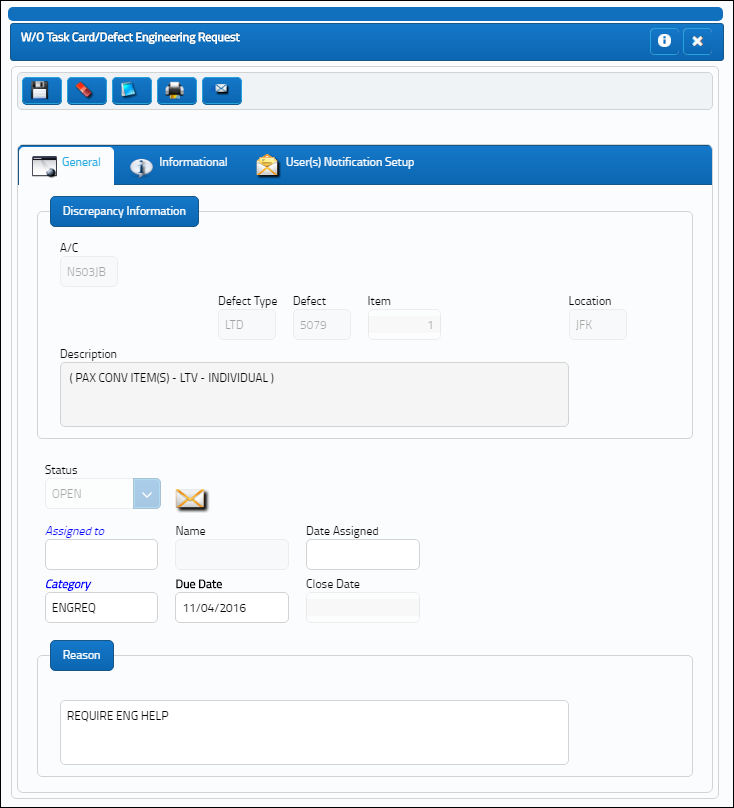
The following options/information is available in this window:
_________________________________________________________________________
A/C
The individual Aircraft tail number.
Defect Type
The type of defect found on the aircraft (for example, Pilot Report, MX Report).
Defect
The defect number (or log book number).
Item
The Task Card's specific Item number.
Location
The Location for maintenance events, inventory stores, orders, transactions, or training events.
Description
A description of the Task Card.
Status
The status of the discrepancy (Open or Reviewed).
Date Assigned
The date when the discrepancy was assigned to the user.
Assigned To
The person that the discrepancy is assigned to.
Close Date
The date when the discrepancy is closed. This field is only available when the Discrepancy is in 'Reviewed' Status.
Category
The discrepancy category as entered by the reporting user.
Reason
The reason for the user to report a discrepancy.
_________________________________________________________________________
Select the Re-send  button to send the Work Order Task Card Discrepancy Notification, as needed.
Additional information can be viewed and entered through the following:
- W/O Task Card/Defect Engineering Request, Informational Tab
- W/O Task Card/Defect Engineering Request, User(s) Notification Setup Tab
- Notes button, via W/O Task Card/Defect Engineering Request
Download Online Help
Print
|
©1997-2018 Trax USA Corp. All rights reserved. This manual may not be copied, photocopied, reproduced, translated, or converted to any electronic or machine-readable form, in whole or in part, without prior written approval from Trax USA Corp. |
 |