 Download Online Help
 Print
|
|
|
|
|


Order Category
The System Transaction Codes are displayed with both the Code Names and Descriptions. The Code Descriptions directly illustrate their functionality and role in the system, as fields are populated and tasks are performed.
Module: |
Orders |
Transaction Code: |
Order Category |
General Description: |
Descriptions of Order Category |
Are Authorization Steps Available? |
Y |
Is System Notification Available? |
Y |
Control Panel Path(s): |
Transaction Code Explorer/ Orders/ Order Category. |
Windows(s): |
w_order_print_sel. |
Functions: |
Category of the Order. |
Note: These Transaction Codes are optional but are used in conjunction with Order Types in the set-up of Authorization Steps.
Available Functionality:
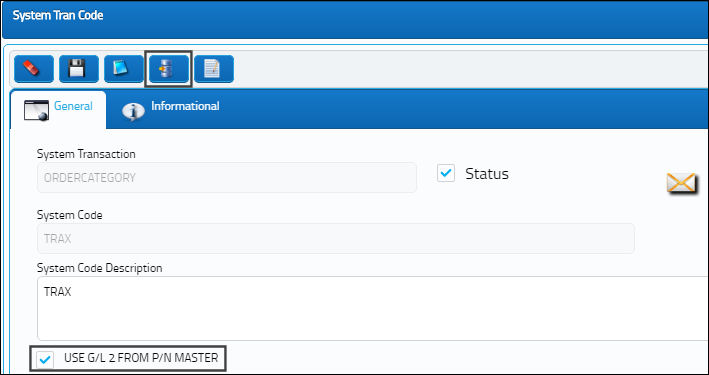
The user may select the Update G/L Code  button to update/modify all open orders.
The system confirms the operation with this message window.

The user may select the Use G/L 2 From P/N Master checkbox to enable the Inventory G/L 2 via the P/N Master, Costing Tab (second General Ledger accounts) and make it effective for Inventory and Repair Orders set up in the P/N Category Transaction Code.
When this checkbox is selected, Purchase Orders created with this particular Order Category will have its G/L information populated by the ordered P/N's Inventory G/L 2 found in the P/N Master, Costing tab. Notice in the below Purchase Order header that the Order Category with the Use G/L 2 From P/N Master checkbox is entered.
When a P/N is entered in the P/O detail window, the P/N's Inventory G/L 2 populates the G/L field.
Notice the P/N's Inventory G/L 2 from the P/N Master, Costing Tab matches the G/L populated in the Purchase Order detail window.
Multi-Company Functionality:
As part of the multi company functionality, from this Transaction Code, users are to enter a System Code and G/L Company that matches the G/L Account of a company/airline code.
Download Online Help
Print
|
©1997-2018 Trax USA Corp. All rights reserved. This manual may not be copied, photocopied, reproduced, translated, or converted to any electronic or machine-readable form, in whole or in part, without prior written approval from Trax USA Corp. |
 |