 Download Online Help
 Print
|
|
|
|
|


Reason Category
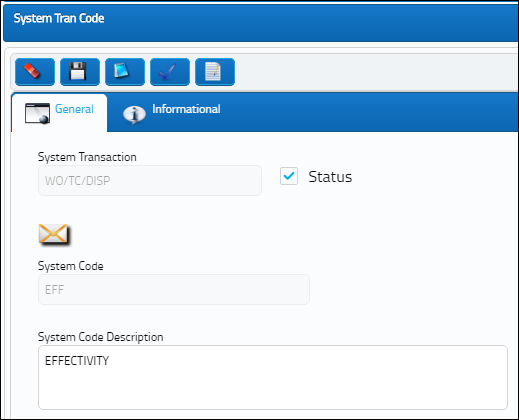
The System Transaction Codes are displayed with both the Code Names and Descriptions. The Code Descriptions directly illustrate their functionality and role in the system, as fields are populated and tasks are performed.
Transaction Code: |
WO/TC/DISP |
General Description: |
Work Order Task Card Discrepancy Reason Category |
Are Authorization Steps Available? |
Y |
Is System Notification Available? |
N |
Control Panel Path(s): |
Production/Update/W/O/T/C Work button/T/C Discrepancy button |
Window(s): |
w_wo_task_card_discrepancy_sdi |
Related Switch(es): |
|
Functions: |
Authorization Process Setting |
Available Functionality:
T/C Discrepancy Authorization Steps:
By selecting the Authorization Step  button users are taken to the T/C Discrepancy Authorization window where users are allowed to modify the T/C Discrepancy Authorization process. Authorization Steps for T/C Discrepancies can be set up in the same basic manner that they are set up for Task Cards and Work Orders.
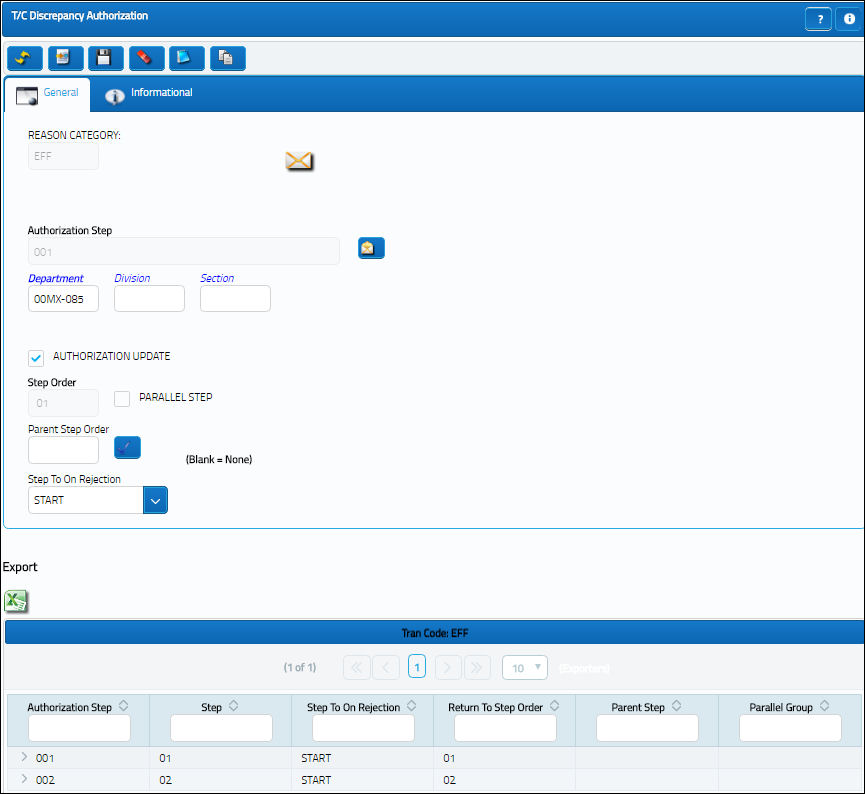
The user will be able to set up multiple authorization steps by the nomenclature which best describes it.
Users may define who will be able to authorize the step using either department, division, or section.
For a user to be able to authorize a step requiring this option, that user's employee record via Settings/ Update/ Employee Master must be active and the Department, Division, and/or Section required for the authorization of the step.
Note: Department is the only mandatory option or Authorization Group.
In order for a user to be included in the authorization process, the Task Card Discrepancy Authorization Group must be set up via the System Tran Codes and that User must be added to the required authorizing group via Engineering/ Explorer/ Task Card Discrepancy Authorization Group Explorer.
For a user to be able to authorize by either of the above mentioned methods, the user will need security access to the Task Card Discrepancy Authorization Explorer via System Administration/ Explorer/ Security Explorer.
Step Order:
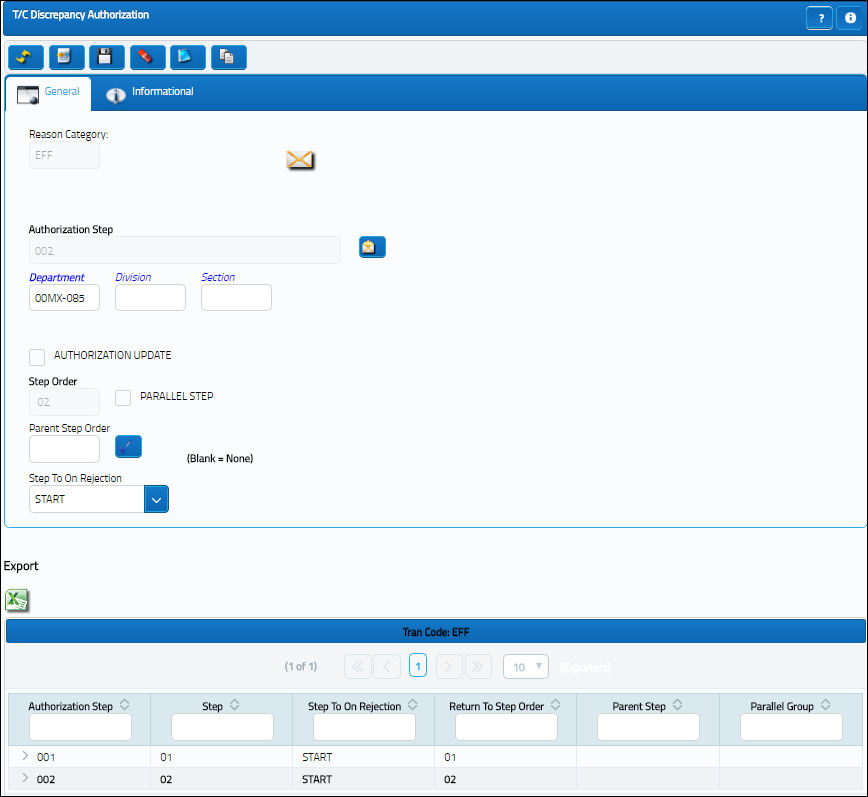
Authorization Processes within the Reason Category will be auto assigned a default step order value beginning with 1. By assigning this default Step Order, the system is able to know the sequential authorization step order to follow. Users may also define a reject process flow per authorization step. Users will have the opportunity to a return, back to 'Start' the beginning of the authorization process, to a particular step at rejection within the authorization process. Or Re-Release, send the discrepancy back to the issuer, which is usually flagged against the final authorization step in the process.
Final Authorization Step:
In order to indicate that the current step is the final authorization step within a process, the user must select the Authorization Update checkbox. Upon the acceptance of this step, the system will issue the discrepancy to the Task Card Discrepancy window, or W/O Task Card/Defect Engineering Request Review, which allows for its review or rejection along with the resolution. During the creation of the Reason Category's authorization process, the user will be able to view their progress on the bottom portion of the T/C Discrepancy Authorization window.
Download Online Help
Print
|
©1997-2018 Trax USA Corp. All rights reserved. This manual may not be copied, photocopied, reproduced, translated, or converted to any electronic or machine-readable form, in whole or in part, without prior written approval from Trax USA Corp. |
 |