
 Share
Share
 Print
Print
|
|
|
|
|


Engineering Control Selection, General Tab
The Engineering Control Selection, General tab allows users to search for existing E/Cs using various search criteria. Once the search criteria has been entered, select the Find  button.
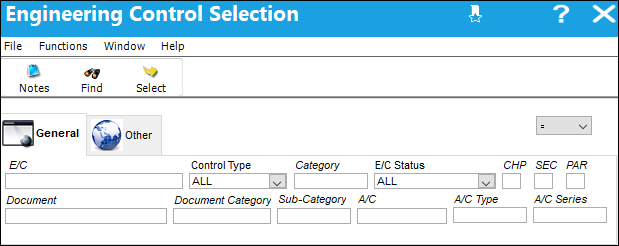
The following information/options are available in this window:
_____________________________________________________________________________________
E/C
The Engineering Control that specifies aircraft or component scheduled maintenance intervals.
Control Type
The Engineering Control Type (E/C or Task Card).
Category
The category of the E/C (e.g., AD, SB, CHECK).
E/C Status
Select the status of the E/C from one of the following options:
ALL - All records.
Applicable/Not Embody - The E/C is applicable to an A/C Type/Series or Part Number, but may not be mandatory. This status allows the E/C to be entered in the system, but does not require compliance.
Cancel - The E/C has been cancelled.
N/A - The originating document (AD, SB, MOD, etc.) has been evaluated and is deemed not effective to a specific A/C or P/N.
Open - The E/C is Open.
Pending - This is the default status. This will be the status until the E/C is authorized. If the user requires holding this E/C until ready, it can be left as Pending even after the record has been saved. Once the E/C is authorized the status will show as Open.
Rejected - The E/C was rejected or not authorized and may need to be sent back through the authorization process for revision. This status should not be selected manually.
Terminated - The E/C is no longer in use. It has either been complied with for all effective aircraft or components, or the action of another E/C has terminated it. When an E/C is terminated, the termination applies to the entire fleet. This status should not be selected manually.
Chapter/Section/Paragraph
The ATA chapter/section/paragraph, as applicable.
Document
The document reference number associated to the E/C.
Document Category
The document category code for the document reference associated to the E/C.
Sub-Category
A Sub Category can be used to further define the E/C Category, if applicable. For example, users may want to classify their ADs for Engines, APUs, and Landing Gear separately. The Sub Category System Transaction Code is set up via Settings/ Explorer/ System Transaction Code/ Engineering.
A/C
The individual aircraft tail number.
A/C Type
The aircraft type the E/C is effective to.
A/C Series
The aircraft series the E/C is effective to.
_____________________________________________________________________________________
Select on the desired record and select the Select  button to view and edit the E/C details.
Share
Print
|
©1997-2026 Trax USA Corp. All rights reserved. This manual may not be copied, photocopied, reproduced, translated, or converted to any electronic or machine-readable form, in whole or in part, without prior written approval from Trax USA Corp. |
 |