 Download Online Help
 Print
|
|
|
|
|


Fixed Asset Registry, General Tab
Select into the Fixed Asset No. field and choose a Fixed Asset from the list. This list contains all Fixed Assets within the system. Make your selection. The system displays the General Tab as follows:
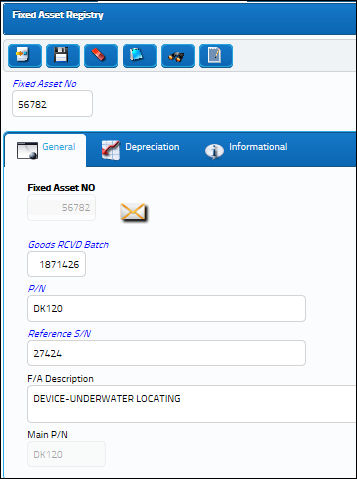
The following options/information is available in this window:
_________________________________________________________________________
Fixed Asset NO
The Fixed Asset number of the part assigned by the system during the initial load or purchase. This number may also be the same as the Fixed Asset No. selected at the top of the screen.
Goods Received Batch
The original batch number when the part was initially introduced/received into inventory.
P/N
The Part Number reference for the aircraft part.
Reference S/N
The reference serial number of the part (if applicable). The reference serial number does not change even if the part is not available (e.g. when issued to an A/C or scrapped due to the FIFO setup). The Switch  FARMVINS must be set to YES for the reference serial number to be effective.
- FARMVINS (Fixed Asset Swap At Removal And Installation Of Part Number) - When set to Yes, will allow the Fixed Asset record to be updated with the new S/N at the removal and installation of the P/N.
F/A Description
A description of the Fixed Asset.
_________________________________________________________________________
Download Online Help
Print
|
©1997-2018 Trax USA Corp. All rights reserved. This manual may not be copied, photocopied, reproduced, translated, or converted to any electronic or machine-readable form, in whole or in part, without prior written approval from Trax USA Corp. |
 |