 Download Online Help
 Print
|
|
|
|
|


Resend Via Invoice Works Button, via Order Update
The Resend Via InvoiceWorks  button sends selected Purchase Orders using InvoiceWorks XML format. This is useful for vendors that send invoices electronically.
From the Order/Update/Order Update window find a Closed Purchase Order. Choose a PO then select the Resend Via InvoiceWorks button.
The following prompt will appear noting that the order will be marked to be resent to InvoiceWorks:
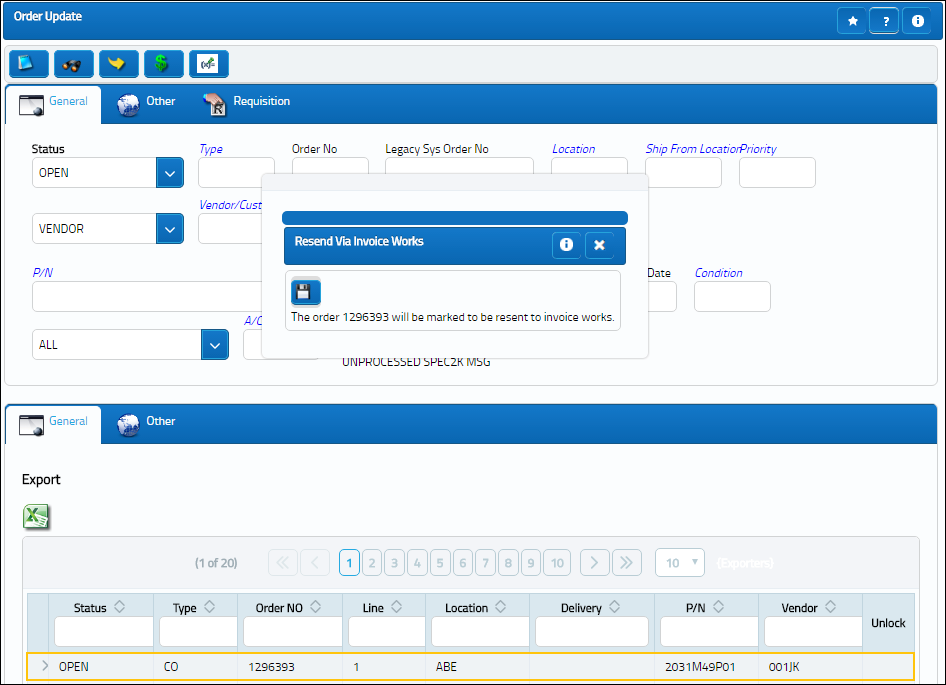
Select the Save  button to proceed. The following message will appear:
Marked to reset: Order has been successfully marked to be resent.
For more information on the InvoiceWorks functionality refer to InvoiceWorks Purchase Orders and Inbound Notification via the Link Training Manual.
Download Online Help
Print
|
©1997-2018 Trax USA Corp. All rights reserved. This manual may not be copied, photocopied, reproduced, translated, or converted to any electronic or machine-readable form, in whole or in part, without prior written approval from Trax USA Corp. |
 |