
 Share
Share
 Print
Print
|
|
|
|
|


After selecting the P/N CTL  button, the user can apply Effectivity of the Engineering Control Shop to particular parts. Within the Engineering Control (Shop) P/N window that opens, the specific information regarding the part to which Effectivity will be applied is entered, along with the options to apply specifications for serial numbers of the part.
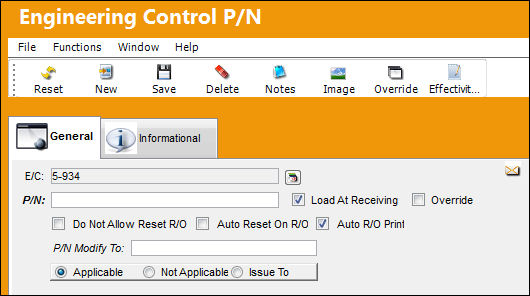
The following information/options are available in this window:
_____________________________________________________________________________________
E/C
The Engineering Control that specifies aircraft or component scheduled maintenance intervals.
P/N
The Part Number reference for the aircraft part. This is the Part Number associated to the E/C.
Load at Receiving checkbox
This checkbox is strictly for the Purchase Order, Loan Order, and Engineering Control receiving and the P/N Initial Load feature. Repair Order for already existing Goods Received Batch Numbers (GRN) where the P/N was changed will apply the effectivity, but the E/C can be deselected as required.
Override checkbox
Select this checkbox if this Part Number has been overridden in the past via the Override  button. Select the Override button to view specific P/N S/N history.
Do Not Allow Reset R/O checkbox
Select this checkbox to indicate that this record should not be reset (i.e. not selected for compliance) when associated with a Repair Order. When this Part Number is on a Repair Order, the default setting for this is that there will be no checkbox available in the control window to be selected or de-selected, it is not visible.
Auto Reset On R/O checkbox
Select this checkbox to indicate that this E/C should be reset (selected for compliance) when this E/C is associated with a Repair Order. This will be the default setting when this Part Number is on a Repair Order. This option can be overridden at the Repair Order level and de-selected.
All P/N E/Cs of Mandatory Classification will receive automatic E/C Compliance upon receipt of Vendor Repair Order.
Auto R/O Print checkbox
If this checkbox is selected, the E/C will automatically be printed on Repair Orders that are issued for the part indicated. This will be the default setting when this Part Number is on a Repair Order. This option can be overridden at the Repair Order level and deselected.
Do Not Allow Reset Production checkbox
Select this checkbox to indicate that this E/C should not be reset (i.e. not selected for compliance) when this E/C is associated with a Production Work Order.
P/N Modify To
When a P/N is entered in this field, (when an existing P/N has this E/C associated and the E/C is complied with, upon receiving the P/N), the P/N will convert to the P/N Modified To Number. When populated, the Modify To in Production/Shop Checkbox appears. This is a user defined option.
- When selected, this checkbox allows the user to modify the part number via a Production/Shop Work Order.
- When not checked, does not allow user to modify part number.
Applicable radio button
Select if this P/N is applicable to this particular E/C.
Not Applicable radio button
Select if this P/N is not applicable to this particular E/C.
Issue To radio button
Select if the E/C has been issued to this P/N. (The E/C does not need to be put into effect). If selected, select the P/N S/N that the user would like to add compliance for.
Range  button
Select this button to access the Engineering Control Range window. This option allows the user to apply effectivity to a serial number range with applicable status and reason information for in range and out of range serial numbers.
_____________________________________________________________________________________
Share
Print
|
©1997-2026 Trax USA Corp. All rights reserved. This manual may not be copied, photocopied, reproduced, translated, or converted to any electronic or machine-readable form, in whole or in part, without prior written approval from Trax USA Corp. |
 |