
 Share
Share
 Print
Print
|
|
|
|
|


Task Card Query
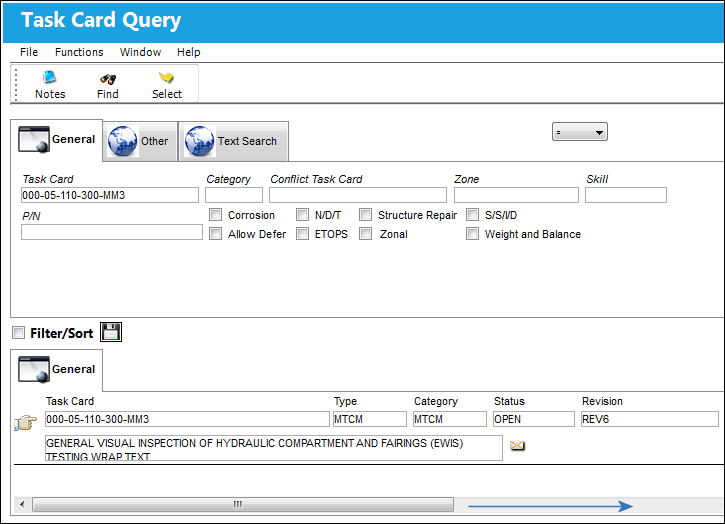
The Task Card Query allows users to search for Task Card records and view related information without being able to edit the data.
Note: The Task Card Query text search functionality cannot work with Word Task Cards.
For information regarding Task Card Query, refer to the Task Card section via the Production Update Menu which can be found in the Production Training Manual.
Search Criteria
The following information/options are available in this window:
_____________________________________________________________________________________
General Tab
Task Card - The Task Card / Job Card that details the scheduled maintenance work.
Category -The category of the Task Card to be changed.
Conflict Task Card -If a Task Card is specified here, it indicates that the current Task Card should not be performed should it appear in a Work Order with the specified Task Card.
Zone - The Zone area for the Task Card (selected from Task Card Control Master).
Skill - The Skill of the employee required for this item. Skills are set up via the Skill Master. The Skills listed for Mechanic or Inspector are validated against the Mechanic/Technician checkboxes associated to the specific Skill via the Skill Master, General tab.
P/N - This is the Part Number required. A part number may be specified only one time per Item Number. However, the same part number may be specified on each unique item number if needed.
Corrosion - Indicates that this is a Corrosion Card. If this box is checked, the appropriately related field will appear on the Work Order.
Allow Defer - Indicates that this card is allowed to be deferred.
N/D/T - Indicates that this is a Non-Destructive Testing Task Card.
ETOPS - Indicates that the Task Card / Non-Routine Task Card is relevant to ETOPS operations.
Structure Repair - Select this checkbox to query for Task Cards that apply to structural repairs.
Zonal - Indicates that the word “ZONAL” will be printed on Task Cards / Non-Routine Task Cards.
S/S/I/D - Indicates that this is a Supplemental Structural Inspection Detail Card.
Weight and Balance - Select this checkbox if this Task Card is for a Weight and Balance Check on the aircraft. If selected, the Weight and Balance button appears.
Other Tab
Manual - Related Manual reference to be utilized for the record.
Manual Reference - A reference to a specific section of the SGML manual that was imported through the TraxDoc. Select into the Manual Reference field for the References Search.
Revision Issued By - The user who issued the revision.
Created By - The user who created the record.
Task Card Type - The Task Card Type, as defined in the Transaction Code. This code can be used to sort and locate Task Cards.
Revision - The date the revision for the Task Card began.
MPD - The Maintenance Planning Document reference for this Task Card.
Text Search
New  Button - Select the New button to search for an additional Task Card.
Delete  button - Select the Delete button to remove a Task Card from the Text Search.
Task Card Containing - Task Cards containing information entered in this field will be retrieved when performing a Text Search.
Similar Keyword checkbox - When this checkbox is selected, the Text Search retrieves Task Cards with similar words. If the checkbox is not selected, it will only retrieve an exact match.
_____________________________________________________________________________________
Results
The following information/options are available in this window:
_____________________________________________________________________________________
Type - The Task Card Type, as defined in the Transaction Code. This code can be used to sort and locate Task Cards.
Category - The category of the Task Card to be changed.
Status - The current status of the Task Card. The status of the Task Card is helpful in determining the stage the Task Card is at with regard to it's completion. Ultimately, the completion of the Task Cards will result in the closing of the Work Order.
Revision - The date the revision for the Task Card began.
Revised By - The user that revised the Task Card.
Revised Date - The Date that the card was revised.
Chapter - The ATA Chapter related to the Non-Routine Task Card. The ATA Chapter auto-populates with the ATA Chapter used to create a Defect Report when a defect is added to an already existing Work Order.
Section - The ATA Chapter Section related to the Non-Routine Task Card. The ATA Section auto-populates with the ATA Section used to create a Defect Report when a defect is added to an already existing Work Order.
Paragraph - The ATA Chapter/Section Paragraph related to the Non-Routine Task Card.
MPD - The Maintenance Planning Document reference for this Task Card.
Editor - Using the Editor drop-list on the Optional 1 Tab of the Task Card, the user can choose the editor that will be used to edit each Task Card Item (Step) on an individual basis. The user may set the value for all new Task Cards with the following configuration switch.
Electrical Power - Select 'Yes' if electrical power is required to perform the Task Card / Non-Routine Task Card, or 'No' if it is not required.
Hydraulic Power - Select 'Yes' is hydraulic power is required to perform the Task Card / Non-Routine Task Card, or 'No' if it is not required.
Area - The Area of the aircraft which this Task Card is related to, as defined in the Trans Code.
Conflict Task Card - If a Task Card is specified here, it indicates that the current Task Card should not be performed should it appear in a Work Order with the specified Task Card.
Corrosion - Indicates that this is a Corrosion Card. If this box is checked, the appropriately related field will appear on the Work Order.
A/C Jacked - Indicates if an aircraft jacking is needed to perform the Task Card / Non-Routine Task Card.
NDT - Indicates that this is a Non-Destructive Testing Task Card.
S/S/I/D - Indicates that this is a Supplemental Structural Inspection Detail Card.
Allow Defer - Indicates that this card is allowed to be deferred.
Etops - Indicates that the Task Card / Non-Routine Task Card is relevant to ETOPS operations.
Zonal - Indicates that the word “ZONAL” will be printed on Task Cards / Non-Routine Task Cards.
N/R Finding Tendency - Indicates that this Task Card requires Non-Routine finding tendency.
Pylon Removal - Indicates that this Task Card requires a pylon removal.
Galley Toilet Removal - Indicates that this Task Card requires a galley toilet removal.
Hydraulic Ground Chart Requirement - Indicates that this Task Card requires a hydraulic ground chart requirement.
Cabin Pressurization - Indicates that this Task Card requires cabin pressurization.
Cabin Ceiling Panels Removal - Indicates that this Task Card requires cabin ceiling panels removal.
Apu Removal - Indicates that this Task Card requires Apu removal.
X Ray - Indicates that this Task Card requires action with X Ray.
Landing Gear Removal - Indicates that this Task Card requires landing gear removal.
Stowage Bin Removal - Indicates that this Task Card requires stowage bin removal.
Test Flight - Indicates that this Task Card requires a test flight.
Out Of Hangar -Indicates that this Task Card notify that the aircraft is out of hangar.
Weighing -Indicates that this Task Card requires weighing.
Flight Surfaces Removal - Indicates that this Task Card requires flight surfaces removal.
Cabin Floor Panels Removal - Indicates that this Task Card requires cabin floor panels removal.
Engine Run-up - Indicates that this Task Card requires engine run up.
Hangar Space Requirement - Indicates that this Task Card requires hangar space requirement.
Ground Air Leak Check - Indicates that this Task Card requires ground air leak check.
Engine Removal -Indicates that this Task Card requires engine removal.
Flight Surface Limitation -Indicates that this Task Card requires a flight surface limitation.
Cargo Panels Removal - Indicates that this Task Card requires cargo panels removal.
Vibration Check - Indicates that this Task Card requires a vibration check.
Air Ground Mode - Indicates that this Task Card requires air ground mode.
Fuel Limitation - Indicates that this Task Card requires fuel limitation.
_____________________________________________________________________________________
Share
Print
|
©1997-2026 Trax USA Corp. All rights reserved. This manual may not be copied, photocopied, reproduced, translated, or converted to any electronic or machine-readable form, in whole or in part, without prior written approval from Trax USA Corp. |
 |