
 Share
Share
 Print
Print
|
|
|
|
|


GSE W/O Pack Print
The GSE Work Order Pack Print is used to organize work packages that detail the work required to be performed. The worksite manager can specify the day/shift's work details by a variety of parameters (like by W/O, Task Card, Location, Date, etc.). How the printed selections are organized can then also be customized to fit what is most convenient for a given worksite (like sequence orders and work checklists).
The Work Pack Print can be accessed from two locations: either directly via Production/ Print/ Work Order Pack Print or from the Word Order Detail window.
 This window is security-controlled via GSE/ Print/ W/O Pack Print. For more information refer to the Security Explorer.
TRAX displays the the Workpack Print window as follows:
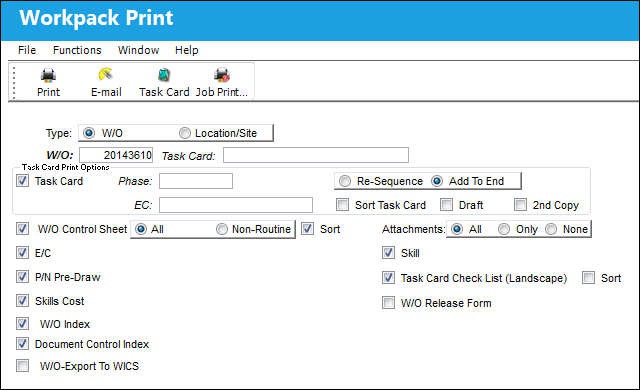
The following information/options are available in this window:
_____________________________________________________________________________________
Type
The type of criteria used to specify the work that must be printed. The options are W/O (which allows users to narrow down the work that needs to be performed by Work Orders) and Location/Site (which allows users to narrow down the work that needs to be performed by Location and Site).
W/O radio button
Selecting W/O allows users to narrow down the work that needs to be printed by Work Order. This radio button is selected by default. If the Print button was selected from the Work Order window, the Work Order number will automatically be entered in the W/O field. Otherwise, select the Work Order required to be printed.
W/O - The Work Order used to categorize, manage, and schedule work requirements for aircraft maintenance.
Task Card - The Task Card / Job Card that details the scheduled maintenance work. If this Task Card is not specified, all of the Task Cards that are associated to the W/O will be printed.
Location/site radio button
Choose to print all Task Cards for a Location/Site. When selected, the W/O, Task Card, and All W/O checkbox disappear. When selected, the following options appear to help narrow down the print results.
Location - The Location for maintenance events, inventory stores, orders, transactions, or training events.
Site - The Site where the work is to be carried out (if applicable).
Category - The Work Order Category that will be printed.
Scheduled Start Date - The date/time that the work is scheduled to begin. The Start Date does not affect whether the Work Order may be deleted or not. However, if the work has been started, the Work Order may not be deleted.
W/O Status - Select a W/O Status to print by.
_____________________________________________________________________________________
Task Card Print Options:
The following information/options are available in this window:
_____________________________________________________________________________________
Task Card checkbox
Select this checkbox to choose a Work Order Task Card to define the print. When the Task Card checkbox is selected, the following options appear:
Phase - The Phase selection allows only certain Phases of the Work Order Task Cards to be printed (for example, the Pre-dock Task Cards for the check).
E/C - The Engineering Control that specifies aircraft or component scheduled maintenance intervals.
Re-Sequence radio button - Select this checkbox to add Task Card to sequence and re-sequence the set as necessary.
Add To End radio button - Select this checkbox to add the Task Card to the end of existing sequence.
Sort Task Card checkbox - Select this checkbox to specify your own sort order for the Task Card data output by the printer. Task Cards are normally sorted in the 'sort order' field from the Task Card itself. If you select the Sort Task Card parameter, a sort selection box will only appear when you click the Print  button, you can then change the required sort order and click OK.
Draft checkbox - Select this checkbox if you want your printouts to be stamped with the word “DRAFT." This allows for the printouts to be used strictly for informational purposes.
2nd Copy checkbox
_____________________________________________________________________________________
W/O Supporting Documents
The following information/options are available in this window:
_____________________________________________________________________________________
W/O Control Sheet
Includes the W/O Control Sheet which allows managers to verify that all of the work was signed off on.
When the W/O Control Sheet checkbox is selected, the following radio buttons and checkboxes appear:

E/C checkbox
The Engineering Control that specifies aircraft or component scheduled maintenance intervals.
P/N Pre-Draw
Select to include P/N Pre-Draw.
Skills Cost
Select to include Skills Cost.
W/O Index
Select to include W/O Index.
Document Control Index
Select this checkbox to include an index of all documents included in the Work Order.
W/O-Export To WICS
Select to include W/O-Export To WICS.
Skill
Select to include Skill.
Task Card Check List (Landscape)
Select to include Task Card Check List (Landscape).
When the Task Card check List (Landscape) checkbox is selected, the Sort checkbox appears.
W/O Release Form
Select to include W/O release form.
_____________________________________________________________________________________
Share
Print
|
©1997-2026 Trax USA Corp. All rights reserved. This manual may not be copied, photocopied, reproduced, translated, or converted to any electronic or machine-readable form, in whole or in part, without prior written approval from Trax USA Corp. |
 |