
 Share
Share
 Print
Print
|
|
|
|
|


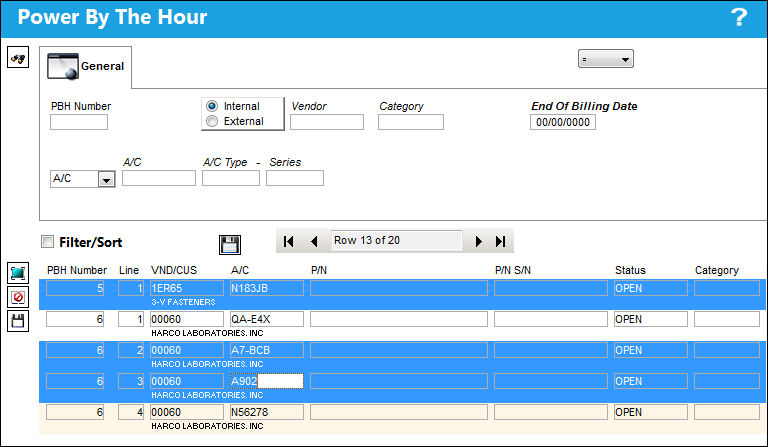
The All-PBH  button in the Power By The Hour window allows users to apply changes to a range of Power By The Hour agreements simultaneously.
- The PBH records to be edited can be filter by using the fields at the top of the window.
- Set the fields as desired then select the Find
 button. All applicable PBH record will appear.
 - Select the desired records, then enter an End of Billing Date.
- Select the Save
 button to update all selected records with the same End of Billing Date.
This button is available from the PBH Header and Detail window.
The following information/options are available in this window:
_____________________________________________________________________________________
PBH Number
The Power By the Hour Number. This is automatically generated within the system and used for monitoring the Power By the Hour contacts.
Internal / External radio buttons
These buttons are used to identify any PBH Items that the user's company is leasing from a vendor or leasing out to a customer.
Internal - The company is leasing from a vendor. With this selected, the Vendor, Location, Priority, and G/L fields are available.
External - The company is leasing out to a customer. With this selected, the Customer and Contract Number fields are available.
Vendor / Customer
Depending on the setting of the Internal or External radio button the Vendor or Customer field will become available for selection of the following:
- The Vendor from which the company is leasing the PBH Item (Internal radio button selected).
- The Customer which the company is leasing out the PBH Item (External radio button selected).
The Vendor must be in the Vendor Master and the Customer must be in the Customer Master via Setting/ Update.
Category
The PBH item category.
End of Billing Date
Indicates the conclusion of the PBH service for the selected items.
A/C Type / Series
The entire aircraft fleet. An entire fleet can be selected for effectivity by selecting the A/C Type/Series checkbox or individual aircraft from that fleet can be selected by selecting the Expand  / Collapse
  buttons.
_____________________________________________________________________________________
Share
Print
|
©1997-2026 Trax USA Corp. All rights reserved. This manual may not be copied, photocopied, reproduced, translated, or converted to any electronic or machine-readable form, in whole or in part, without prior written approval from Trax USA Corp. |
 |