 Download Online Help
 Print
|
|
|
|
|


Read & Sign Query
The Read & Sign Query is used to check the status of Read & Sign requests using one of many criteria. Users enter search criteria in the top of the window, and the results are displayed in the table to the bottom.
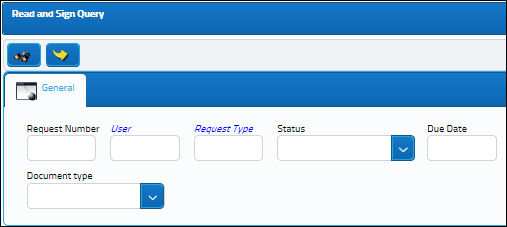
View a Closed Read & Sign request as follows:
- Go to Library / Query / Read & Sign Query.
- Select ‘Closed’ in the Status Field.
- Click the Find Button to list all closed Read & Sign.
- Select a Read & Sign and click the Select Button to it. Click the Select Button to go to the Read & Sign Detail.
Note: Actual records cannot be edited from the Query window. For more information on how to create Read & Sign requests, refer to the Read & Sign window.
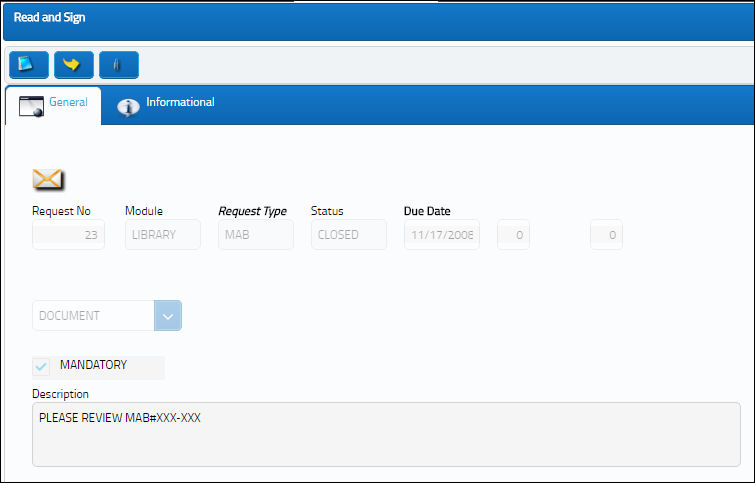
The user can view additional information about a selected record by clicking the Select  button. The Read and Sign header window will appear.
Download Online Help
Print
|
©1997-2018 Trax USA Corp. All rights reserved. This manual may not be copied, photocopied, reproduced, translated, or converted to any electronic or machine-readable form, in whole or in part, without prior written approval from Trax USA Corp. |
 |