 Download Online Help
 Print
|
|
|
|
|


Manual Registration, General Tab
The Manual Registration, General Tab is used to query for manuals based on the following search criteria. Enter any of the below search criteria to query for a desired manual and select the Find  button.
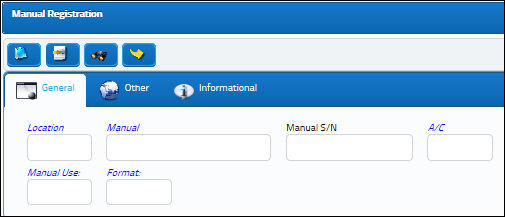
The following options/information is available in this window:
_________________________________________________________________________
Logic drop down 
Select one of the following logic functions to filter for data:
<= Less than or equal to.
<> Not equal to.
= Equal to.
>= Greater than or equal to.
Like Show data like or similar to.
Location
The location of the manual as entered during manual registration.
Manual
The name of title of the manual.
Manual S/N
The Serial Number of the Manual. This will be unique for each Manual entered.
Note: The sequential numbering system for auto assign S/Ns is set up using Switch  MSNAUTO in the System Configuration Explorer Option.
A/C
The individual Aircraft tail number to which the manual is effective.
Manual Use
The manual purpose as entered during manual registration.
Format
The format of the manual.
_________________________________________________________________________
Download Online Help
Print
|
©1997-2018 Trax USA Corp. All rights reserved. This manual may not be copied, photocopied, reproduced, translated, or converted to any electronic or machine-readable form, in whole or in part, without prior written approval from Trax USA Corp. |
 |