
 Share
Share
 Print
Print
|
|
|
|
|


MSNAUTO - Manual Registration S/N Auto Assigned
Manual Registration S/N Auto Assigned
Affected Window: w_manual_registration_eu
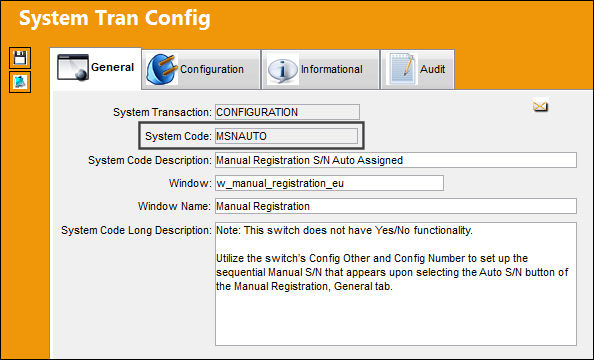
This switch does not have Yes/No functionality.
Utilize the switch’s Config Other and Config Number to set up the sequential Manual S/N that appears upon selecting the Auto S/N button of the Manual Registration, General tab.
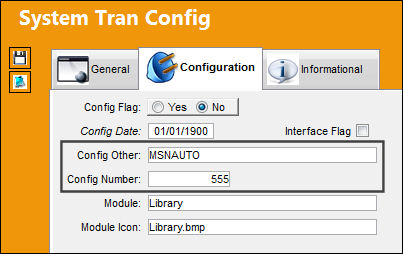
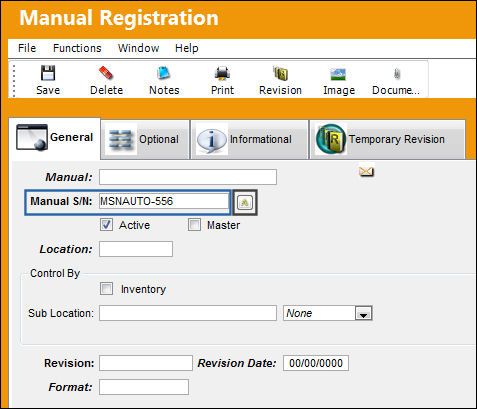
The following Manual Registration is being conducted. Upon selecting the Auto S/N button, notice the Manual S/N is populated with the Config Other specified by the switch along with the sequential number of the switch’s Config Number.
Share
Print
|
©1997-2026 Trax USA Corp. All rights reserved. This manual may not be copied, photocopied, reproduced, translated, or converted to any electronic or machine-readable form, in whole or in part, without prior written approval from Trax USA Corp. |
 |