
 Share
Share
 Print
Print
|
|
|
|
|


Select the New  button to create a new ATA section.
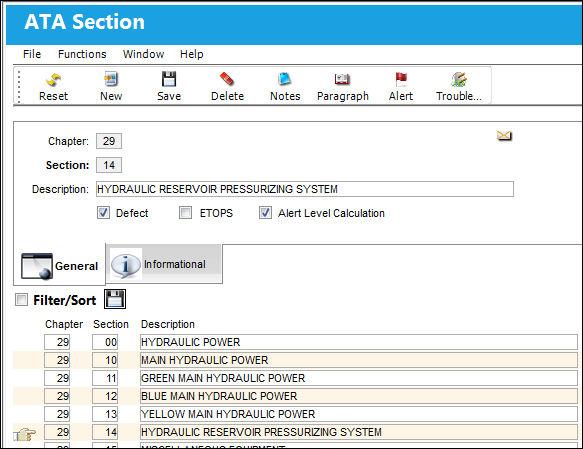
The following information/options are available in this window:
_____________________________________________________________________________________
Chapter
The Chapter for which the Section is being set to automatically appear.
Section
The Section number required can be entered.
Description
The Description field contains the description for the ATA Chapter/Section.
Defect checkbox
Check this box if you want this Chapter/Section to appear in the list of available chapters/sections to choose from when creating a new Defect Report. You can create a new Defect Report in Technical Records/ Update/ Defect Report.
ETOPS checkbox
Check to indicate that this Section number is ETOPS “significant." When Defect Reports are created that contain the ETOPS rated Sections, the 'ETOPS Event Defect Report Print' (via Technical Records/ Print/ Defect Report Print) can be run to view those particular Defects.
 Note: The ETOPS Radio button will be auto-populated in the Defect Report Detail, General tab based on the information entered in the Chapter and Section fields, as well as the selection of the ETOPS checkbox.
Alert Level Calculation checkbox
Select if you want this ATA's Alert Level to be automatically updated when the Alert Level Recalculation task is performed via Reliability /Print/ Alert Level Recalculation.
_____________________________________________________________________________________
Share
Print
|
©1997-2026 Trax USA Corp. All rights reserved. This manual may not be copied, photocopied, reproduced, translated, or converted to any electronic or machine-readable form, in whole or in part, without prior written approval from Trax USA Corp. |
 |