
 Share
Share
 Print
Print
|
|
|
|
|


Select the appropriate Location in the Settings/Update/Location Master then select the Site  button. The system displays the following Location Site window:
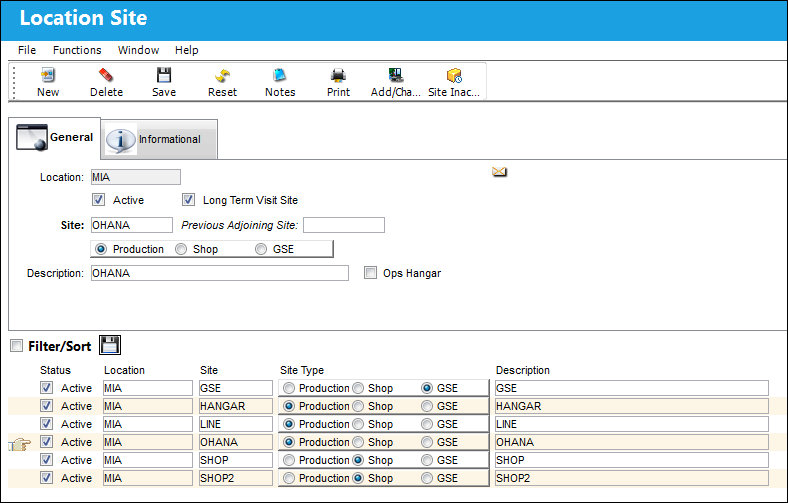
The following information/options are available in this window:
_____________________________________________________________________________________
Location
The Location for maintenance events, inventory stores, orders, transactions, or training events.
Active checkbox
Select this checkbox if the location is active.
Long Term Visit Site checkbox
Select to make this Site available for Long Term Planning and the Production Control application. This checkbox is only available for Production Sites as indicated by the Production radio button. For more information refer to the Long Term Planning windows via the Planning Training Manual and the Production Control application.
Site
The Site where the work is to be carried out (if applicable).
Previous Adjoining Site
The appropriate adjoining site code. This checkbox is only available for Production Sites as indicated by the Production radio button.
Production / Shop / GSE radio buttons
Choose whether the site is for Production, Shop, or GSE by selecting the appropriate radio button.
Description
A description of the site.
Ops Hangar checkbox
 This checkbox is interface related and is not available for most companies.
_____________________________________________________________________________________
Share
Print
|
©1997-2026 Trax USA Corp. All rights reserved. This manual may not be copied, photocopied, reproduced, translated, or converted to any electronic or machine-readable form, in whole or in part, without prior written approval from Trax USA Corp. |
 |