
 Share
Share
 Print
Print
|
|
|
|
|


TRAX will NOT automatically combine different combinations in order to prevent wrong results (for example, 1 medium aircraft and 2 small aircraft will not combine as they are in different configurations and special restrictions might apply). Any combination within a configuration up to the maximum number of aircraft is possible (for example, 2 small aircraft type A and 2 small aircraft type B). In order to set up the different configurations, set the radio button to Capacity:
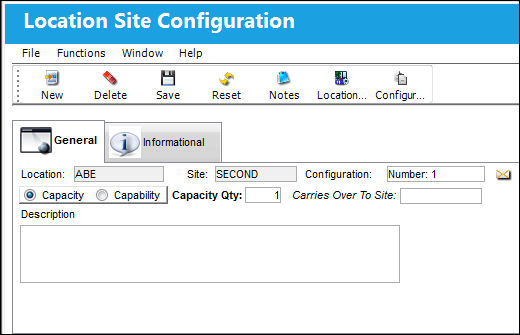
The following information/options are available in this window:
_____________________________________________________________________________________
Location
The Location for maintenance events, inventory stores, orders, transactions, or training events.
Site
The Site where the work is to be carried out (if applicable).
Configuration
The name of the configuration.
Capacity or Capability radio button
Select the Capacity or Capability radio button.
Capacity Qty
The total number of aircraft for this configuration. This will be the maximum number of aircraft that can be planned on one site according to the configuration on the next screen.
Carries Over
If the site neighbors another site, enter the bordering site.
Description
A more detailed description of the configuration.
_____________________________________________________________________________________
Share
Print
|
©1997-2026 Trax USA Corp. All rights reserved. This manual may not be copied, photocopied, reproduced, translated, or converted to any electronic or machine-readable form, in whole or in part, without prior written approval from Trax USA Corp. |
 |