
 Share
Share
 Print
Print
|
|
|
|
|


From the MEL Master window, select the Items  button. TRAX displays the MEL Master Items window.
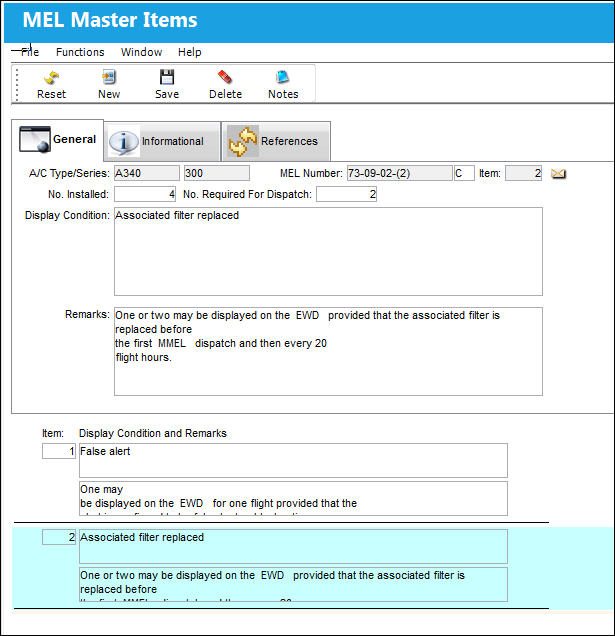
The following information/options are available in this window:
_____________________________________________________________________________________
A/C Type/Series
The Aircraft Type and Series/Fleet assignment.
MEL Number
The Minimum Equipment List number.
Dispatch Condition
The conditions to be fulfilled in order to allow aircraft operation with a specific item inoperative. These refer to the period of consecutive calendar days (excluding day of discovery) that an aircraft can be operated with inoperative items. The intervals are input as letter categories (i.e., 'A' = days not specified, 'B' = 3 days, 'C' = 10 days, 'D' = 120 days). This field could also be known as the Repair Interval or Rectification Interval. This field is informational.
Item
The item for which the MEL may allow aircraft dispatch.
No. Installed
The number of parts related to the MEL which are supposed to be installed on the A/C. This field is informational.
No. Required for Dispatch
Out of the number installed, the minimum allowed to be installed at dispatch. This field is informational.
Display Condition
Any conditions which may allow for the aircraft to be out of scope with the MEL.
Remarks
Additional information regarding the above condition.
_____________________________________________________________________________________
Share
Print
|
©1997-2026 Trax USA Corp. All rights reserved. This manual may not be copied, photocopied, reproduced, translated, or converted to any electronic or machine-readable form, in whole or in part, without prior written approval from Trax USA Corp. |
 |