
 Share
Share
 Print
Print
|
|
|
|
|


Reliability Pack Print, General Tab

From Reliability Pack Print window users can combine different Print reports into a single Pack Print. To Create a Pack Print select the New  button, enter the applicable information, and select the Save
  button. Pack Print records created in the Reliability Pack Print window can then be printed from the Reliability Pack Print Selection window.
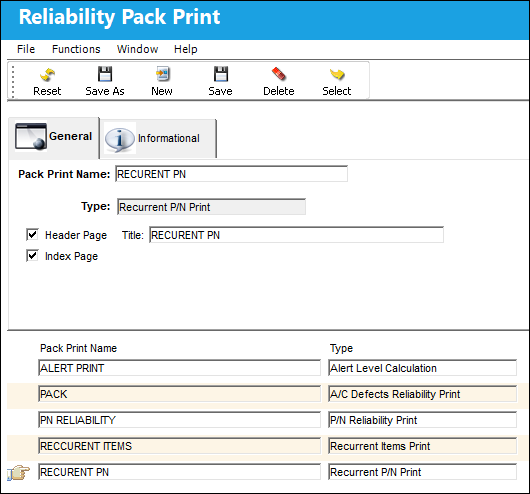
The following information/options are available in this window:
_____________________________________________________________________________________
Pack Print Name
The name of the Pack Print record.
Type
Select the Type of Reliability Print that corresponds to a specific Reliability module Print window (e.g., Alert Level Calculation, A/C Defects Reliability Print, P/N Reliability Print, Recurrent Items Print, Recurrent P/N Print).
Header Page
Select this checkbox to include a header page and enter a Title for the Pack Print.
Index Page
Select this checkbox to include an index of all reports contained in the Pack Print.
_____________________________________________________________________________________
Share
Print
|
©1997-2026 Trax USA Corp. All rights reserved. This manual may not be copied, photocopied, reproduced, translated, or converted to any electronic or machine-readable form, in whole or in part, without prior written approval from Trax USA Corp. |
 |