
 Share
Share
 Print
Print
|
|
|
|
|


The Order Discrepancy Tab reflects and discrepancies made against the Purchase Order. This tab is view only and cannot be updated in this window.
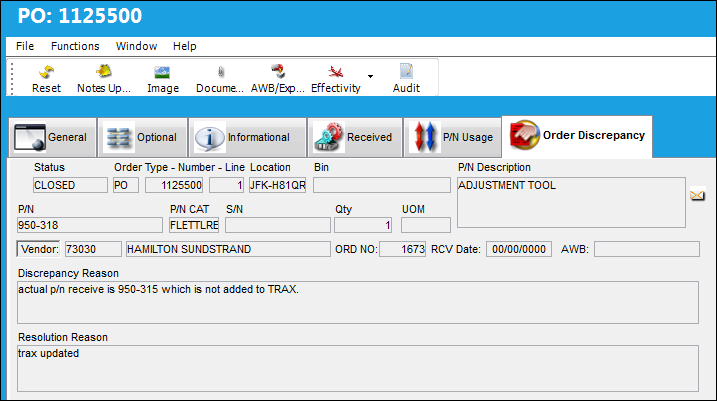
The following information/options are available in this window:
_____________________________________________________________________________________
Status
The Status of the Discrepancy.
Open - The status the discrepancies have after they have been entered.
Reviewed - The status the Purchasing Department sets after reviewing the case and entering a resolution.
Cancel - Select this Status to Cancel the Discrepancy and utilize the Order Receiving without any problems.
Order Type/Number
Order type and number of the discrepancy order.
Line
The specific Line item of the Order. Each Line item could represent a different part included in the same order.
Location
The Location for maintenance events, inventory stores, orders, transactions, or training events.
Bin
The specific storage bin within the inventory location.
P/N Description
The description of the part.
P/N
The Part Number reference for the aircraft part.
P/N CAT
The category of the part as defined in Settings/ Explorer/ System Transaction Code Explorer/ Settings/ P/N Category (e.g. Rotable, Consumable, Repairable) and entered for the particular part in the P/N Master.
S/N
The Serial Number for the specific serialized part.
Qty
Number of parts the discrepancy is issued for.
UOM
The unit of measure. This will default if associated with a Part Number as defined in the P/N Master. Transactions for parts can be conducted in a different UOM than defined in the P/N Master. However, upon receiving the UOM, conversion will automatically adjust the quantities, providing that the conversion rate is defined in the UOM System Transaction Code (via Setting/Explorer/System Transaction Code).
Vendor
The system code for the service/part provider.
ORD NO
The system generated Order Receiving Discrepancy Transaction number.
RCV Date
The date the order was received.
AWB
The airway bill number related to the part.
Discrepancy Reason
The reason for the discrepancy as entered by the Receiving Department.
Resolution Reason
Resolution as entered by the Purchasing Department.
Enter the resolution agreed on with the vendor and set the status to Reviewed.
_____________________________________________________________________________________
Share
Print
|
©1997-2026 Trax USA Corp. All rights reserved. This manual may not be copied, photocopied, reproduced, translated, or converted to any electronic or machine-readable form, in whole or in part, without prior written approval from Trax USA Corp. |
 |