 Download Online Help
 Print
|
|
|
|
|


Defect Reports Print
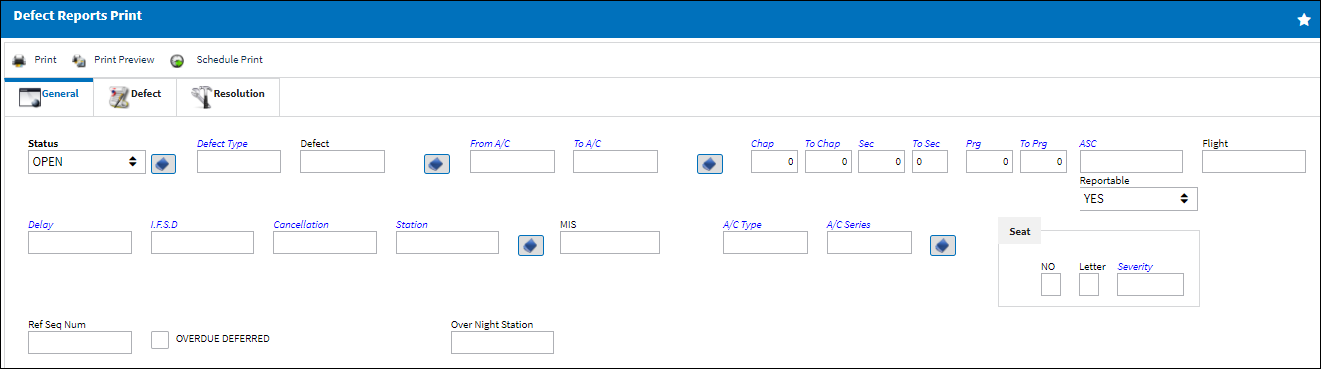
The Defect Report Print window allows the user to view and print reports that contain Defect Report information.
Note: These are customized prints. Print layouts and options may vary per operator.
The following options/information is available in this window:
_________________________________________________________________________
General tab
Status - The status of the Defect Report.
All - Select the 'All' status to query for all logs.
Open - Select the 'Open' status to query for all logs in 'Open' status.
Closed - Select the 'Closed' status to query for all logs in 'Closed' status.
Defect Type - The type of defect found on the aircraft (for example, Pilot Report, MX Report). For additional information, refer to the Defect Type Transaction Code, via the Technical Records Transaction Code Manual.
Defect - The defect number (or log book number).
From A/C - To A/C - Enter the aircraft or aircrafts range.
Chapter / Section / Paragraph - The ATA chapter/section/paragraph, as applicable.
ASC - The Aircraft System Code.
Flight - The flight reference number/information.
Delay - The Delay Code (i.e. Equipment Failure, Scheduled Ground Time).
I.F.S.D - The Engine In-Flight Shut Down code (i.e. Foreign Object Debris, Lightening Strike). These codes can be set up via the Technical Records Transaction Codes. Go to Settings/ Explorer/ System Transaction Code/ Technical Records.
Cancellation - The flight cancellation code if applicable (i.e. Maintenance Repairs, Ground Servicing). These codes can be set up via the Technical Records Transaction Codes. Go to Settings/ Explorer/ System Transaction Code/ Technical Records.
Station - The station where the defect was worked on.
MIS - The Mechanical Interruption Summary related to this Defect.
A/C Type / Series - The aircraft Type and Series / Fleet assignment.
Ref Seq Num - The reference sequence number of this Defect.
Overdue Deferred checkbox - Select this checkbox and will include defects that are overdue based on their deferral schedule.
Over Night Station - Over Night Station Code.
Seat Number - The passenger seat number on the aircraft.
Seat Letter - The passenger seat letter on the aircraft.
Seat Severity - The Seat Severity Code used to indicate the level of severity (i.e damage) of the seat. This can be selected from the list of Seat Severity Transaction Codes via the Technical Records System Transaction Codes.
Defect tab
Defect CAT - The Defect Report's Category Code.
Reported By - The user reporting the Defect.
M.E.L. drop down - Select to filter by ALL, MEL or Non MEL.
Reported Date From / To - The date range the defects were reported on.
MEL checkbox - Select this checkbox if the Defect was deferred by an MEL.
CDL checkbox - Select this checkbox if the Defect was deferred by a CDL.
GMM checkbox - Select this checkbox if the Defect was deferred by a GMM.
ALL checkbox - Select this checkbox to include MELs, GMMs and CDLs in the query.
M.E.L CAT - The Minimum Equipment List (MEL) reference related to the Defect Report deferral. MEL/CDL may be defined, entered, or digitally imported in the MEL Master. For additional information, refer to the MEL Master via the Settings Training Manual.
M.D.D.R. - This is also known as a Deferred Maintenance Item (DMI). This field allows users to enter the deferment on one defect report (aircraft log page) by using the MDDR number on another defect report (aircraft log page) so that the user may resolve the MDDR.
Authorization - The Authorization status of the Defect.
Defer - Reason for the defect deferment; for example M.E.L., Dent, No Parts, WATCH item, etc. This field is part of the Functional System Transaction Codes and contents embedded functionality which includes Authorization Requirements, Default Requisitions prompts and Defaulted MDDR Closings.
Defer By - The Mechanic/Maintenance employee who is deferring the defect. Populating this field will make the employee's name to appear right below this field. For selection, any employees and/or contractors who have the authority to defer a defect must be entered in the Employee Master via the Settings module.
Defer Category - Category of the deferment. This is the reference if the deferral is operational, or performance related. This field may be used to reference if the deferral is related to a General Maintenance Manual or a Standard Practice Manual.
Defer Due Date - The date and time the deferment must be resolved by.
Defect Description - The Description of the Defect which describes the problem found or notes the service being performed.
Customer - Customer reference number. This information is pulled from the A/C Master, Other 1 Tab via the Settings/Update/A/C Master/Other 1 Tab.
SDR - The Service Difficulty Report related to this Defect.
Defer From W/O - When a Scheduled Maintenance Event is deferred automatically, a 'WO/DEFER' Defect Type is generated. It will reference the Work Order which the Deferred Defect Report was created from in this field.
Defer From T/C - When a Scheduled Maintenance Event is deferred automatically, a 'WO/DEFER' Defect Type is generated. This will reference the Task Card in relation to the Work Order which the Deferred Defect Report was created from in this field.
Required Inspection Item checkbox - Select this checkbox if the Defect is a a required inspection item.
Resolution tab
Resolution Category - Resolution category codes.
Resolve By - The employee who resolved the defect.
From Resolve Date - From the date of the resolution was initiated.
To Resolve Date - To the date of the resolution was concluded.
W/O - Work order number.
Resolved Station - The station where the defect was resolved.
Resolved On Log - The log related to the resolution.
Resolved On Item - The Item related on the resolution.
Resolution Description - The description of the resolution of the defect item.
Created Date From / To - The date the record was created.
Fault Confirm drop down - To select option from the drop down: All Confirmed, Not Confirmed, Pending.
_________________________________________________________________________
Download Online Help
Print
|
©1997-2018 Trax USA Corp. All rights reserved. This manual may not be copied, photocopied, reproduced, translated, or converted to any electronic or machine-readable form, in whole or in part, without prior written approval from Trax USA Corp. |
 |