 Download Online Help
 Print
|
|
|
|
|


Site Notes
From the Site Notes section of the homepage, users can add helpful notes throughout the day that can be passed on to later shifts via the Work Turnover functionality. These notes are compiled throughout the day and can be accessed by the following shifts through the Shift Handover button from the toolbar.
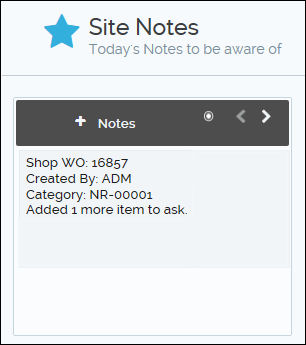
The following options are available for the Side Notes section:
_________________________________________________________________________
Notes  button
Select this button to add a new note for the day.
Note Selection radio buttons
Select these buttons to shuffle through the notes for the day. There are two selection options:
 The side arrows allow users to move from note to note in which ever direction they choose.
 The circular radio buttons allow users to select specific notes. There will be one radio button for each note listed that day. (If there are more than 3 notes for the day, the circular radio buttons are changed to a dropdown selection field that allows users to select the particular note.)
Note Description
The details of the notes are listed in the center of this window.
- If the note is added from the Site Details section of Production Control (e.g., via a Work Order's N/R Task Card tab), the Category, W/O, and Bay information will be listed with the particular Work Order details. The Description field will contain the note that was added from that tab.
- If the note is added from the Notes button (above), then the Category will default to 'NOTE' and the W/O and Bay fields will be null. The Description field will contain the note that was added from the Notes button.
Preview  button
Select this button to view the note in a pop-up screen. This is useful in the event that the note takes up more space than allotted in the basic Site Note description screen.
_________________________________________________________________________
When the Notes button is selected, the following window pops up for users to add their notes. Select into the free-text field to enter the note.
Select the Save Note  button to add this note to the Site Notes for the day.
Select the Report checkbox to include this note in the applicable reports (once generated).
Download Online Help
Print
|
©1997-2018 Trax USA Corp. All rights reserved. This manual may not be copied, photocopied, reproduced, translated, or converted to any electronic or machine-readable form, in whole or in part, without prior written approval from Trax USA Corp. |
 |