 Download Online Help
 Print
|
|
|
|
|


The results of the A/C P/N Transaction History Audit are displayed in the General tab, as follows:
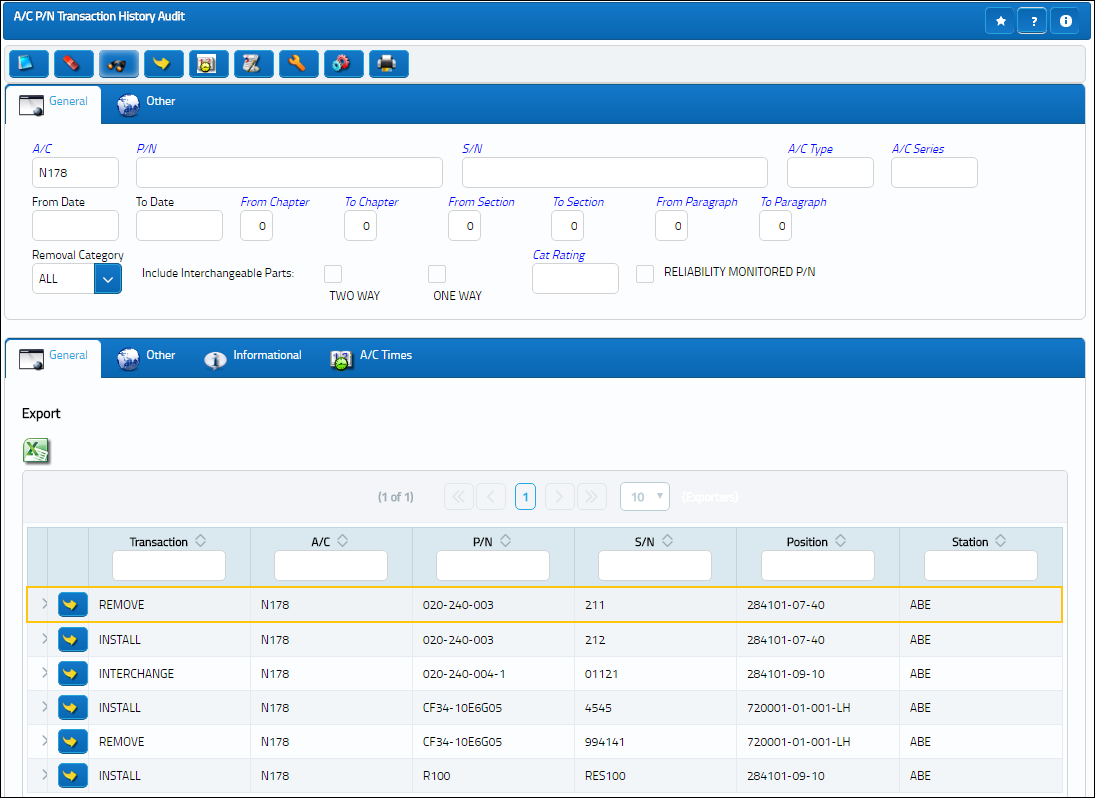
The following options/information is available in this window:
_________________________________________________________________________
Transaction
The type of aircraft part transaction being performed.
A/C
The individual Aircraft tail number.
P/N
The Part Number reference for the aircraft part.
S/N
The Aircraft's Serial Number which is provided by the manufacturer. This serial number is like a registration number, but it is not dependent on a country code and therefore never changes.
Position
The Position of the item being installed/removed.
Station
The Station where the transaction will take place. Users are able create A/C P/N Transactions for locations that are Maintenance Facilities and NOT Station locations. Through printer configurations, labels for Serviceable and Unserviceable parts can be sent to different printers depending on the Station in the A/C P/N Transaction window. In previous releases, only the part's Location was considered.
_________________________________________________________________________
Download Online Help
Print
|
©1997-2018 Trax USA Corp. All rights reserved. This manual may not be copied, photocopied, reproduced, translated, or converted to any electronic or machine-readable form, in whole or in part, without prior written approval from Trax USA Corp. |
 |