 Download Online Help
 Print
|
|
|
|
|


Engineering Compliance
The Engineering Compliance window is used to query for Engineering Compliance records based on the following search criteria. Enter any of the below search criteria to query for a desired record and select the Find  button.
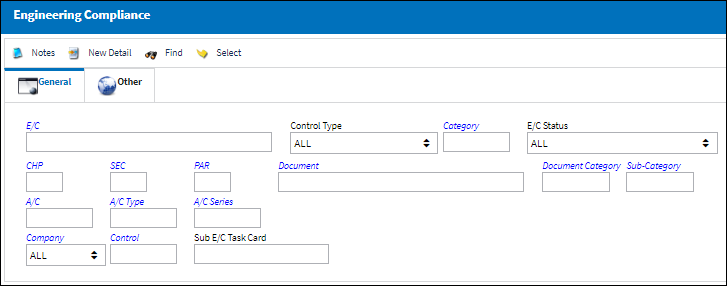
The following options/information is available in this window:
_________________________________________________________________________
E/C
The Engineering Control that specifies aircraft or component scheduled maintenance intervals.
Control Type
The Engineering Control Type (E/C or Task Card).
Category
The category of the E/C (i.e. AD, SB, CHECK).
E/C Status
The status of the E/C. When creating a new E/C the initial status will default to Pending; if the user requires to hold this E/C until ready it can be left as Pending, or alternatively it can be changed to another status.
When an E/C Status is changed, the status, in most cases, cascades down to the E/C effective items. For more information refer to E/C Status Cascade Functionality via the Engineering - E/C Training Manual.
The following Status options are available:
Applicable/Not Embody - The E/C is applicable to an A/C Type/Series or Part Number, but may not be mandatory. This status allows the E/C to be entered in the system, but does not require compliance.
Cancel - The E/C has been cancelled.
N/A - The E/C is not effective to a specific A/C or P/N.
Open - The E/C is Open.
Pending - This is the default status. This will be the status until the E/C is authorized.
Rejected - The E/C was rejected or not authorized and may need to be sent back through the authorization process for revision.
Terminated - The E/C is no longer in use. It has either been complied with for all effective aircraft or components, or the action of another E/C has terminated it. When an E/C is terminated, the termination applies to the entire fleet.
Chapter / Section / Paragraph
The ATA chapter/section/paragraph, as applicable.
Document
The document reference number associated to the E/C.
Document Category
The document category code for the document reference associated to the E/C.
Sub-Category
A Sub Category can be used to further define the E/C Category, if applicable. For example, you may want to classify your ADs for Engines, APUs, and Landing Gear separately. The Sub Category Transaction Code is set up via Settings/ Explorer/ System Transaction Code/ Engineering.
A/C
The individual Aircraft tail number.
A/C Type
The aircraft type the E/C is effective to.
A/C Series
The aircraft series the E/C is effective to.
Company
The name of the airline company for which the E/C will be utilized.
Note: For more information, refer to the Multi Company Functionality.
Control
The Control (A/C, P/N, A/C Type, or ALL) used to auto generate the E/C reference. This field is used for naming purposes only. When the 'ALL' option is selected the E/C Control field will not auto generate the E/C reference. The E/C reference will auto generate from the Sub E/C field.
Sub E/C Task Card
Enter the associated Sub E/C Task Card.
_________________________________________________________________________
Download Online Help
Print
|
©1997-2018 Trax USA Corp. All rights reserved. This manual may not be copied, photocopied, reproduced, translated, or converted to any electronic or machine-readable form, in whole or in part, without prior written approval from Trax USA Corp. |
 |