
 Share
Share
 Print
Print
|
|
|
|
|


GSE Master, General Tab
Select the New  button to enter a new record.
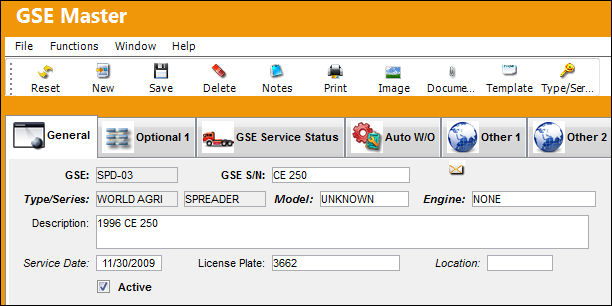
The following information/options are available in this window:
_____________________________________________________________________________________
GSE
Ground Support Equipment Number.
GSE S/N
Ground Support Equipment Number Serial Number.
Type/Series
Enter the Type/Series for this GSE. Since this is not a free text field, you may click into the field to select those GSE Type/Series already created in the System. These fields are identified when the name is in italics.
Model
The manufacture modification number. This field is only informational.
Engine
The engine type of the ground service equipment item, as applicable.
Description
Enter the Description of the equipment (i.e. Ground Power Unit). Notice this field is allowed for free text and is not required.
Service Date
Enter the Service Date of this GSE. The Service date allows the user to show when this GSE was placed into service. The default date will be today's date.
License Plate
The license plate reference of the GSE.
Location
The location of the GSE.
Active checkbox
Allow the Active checkbox to remain checked. This will ensure users are able to select this GSE for Engineering Controls (Preventative Maintenance), Purchase Orders, Requisitions, and most Inventory Transactions.
_____________________________________________________________________________________
Share
Print
|
©1997-2026 Trax USA Corp. All rights reserved. This manual may not be copied, photocopied, reproduced, translated, or converted to any electronic or machine-readable form, in whole or in part, without prior written approval from Trax USA Corp. |
 |