
 Share
Share
 Print
Print
|
|
|
|
|



The Box, General tab allows the user to view inventory related information regarding the part (Location, Bin, Batch, etc.) similar to the information provided in the results section of Inventory Transaction.
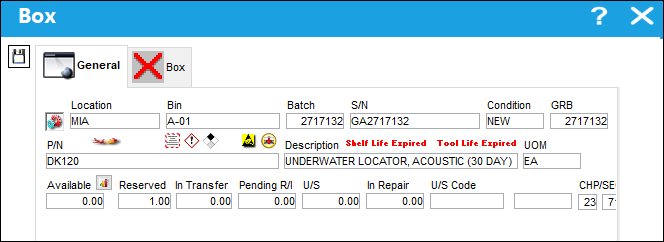
The following information/options are available in this window:
_____________________________________________________________________________________
Location
The Location for maintenance events, inventory stores, orders, transactions, or training events.
Bin
The specific storage bin within the inventory location.
Batch
The inventory number that is currently associated with a part or group of parts. A part's Batch number can change after various types of transactions take place.
S/N
The Serial Number for the specific serialized part.
Condition
The condition of the part.
GRB
The original inventory number assigned to the part or group of parts when initially introduced/received into inventory. This number will remain the same for a part even if/when the part's Batch number changes.
P/N
The Part Number reference for the aircraft part.
Description
The description of the part.
UOM
The unit of measure. This will default if associated with a Part Number as defined in the P/N Master. Transactions for parts can be conducted in a different UOM than defined in the P/N Master. However, upon receiving the UOM, conversion will automatically adjust the quantities, providing that the conversion rate is defined in the UOM System Transaction Code (via Setting/Explorer/System Transaction Code).
Available
Quantity of the part available.
Reserved
Quantity of the part reserved.
In Transfer
Quantity of the part in transfer.
Pending R/I
Quantity of the part pending receiving inspection.
U/S
Quantity of the part that is unserviceable.
In Repair
Quantity of the part in repair.
U/S Code
Unserviceable Code that applies to the part, to be stored in a quarantine location.
CHP/SEC/PAR
The ATA chapter/section/paragraph, as applicable.
_____________________________________________________________________________________
Share
Print
|
©1997-2026 Trax USA Corp. All rights reserved. This manual may not be copied, photocopied, reproduced, translated, or converted to any electronic or machine-readable form, in whole or in part, without prior written approval from Trax USA Corp. |
 |