
 Share
Share
 Print
Print
|
|
|
|
|


The Vendor Tab in the Audit Requirement Master window will only be visible in the event of a Vendor Audit. The Tab displays the actual Vendor details as entered via Settings/Update/Vendor. The details can be updated or edited as necessary.
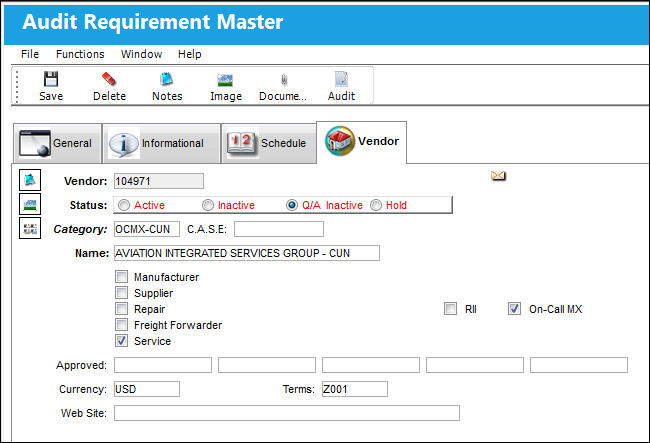
If the Vendor has a scheduled Audit and that schedule has not been updated on time, they will automatically become out of compliance and the system will change the status of the Vendor to ‘Q/A Inactive.'
In the event of a change in the Vendor’s status, the system will send a notification as defined via Settings/Explorer/System Transaction Code/Settings/Vendor Category.
Please refer to the Settings Manual for additional information regarding the Vendor Master if required.
Share
Print
|
©1997-2026 Trax USA Corp. All rights reserved. This manual may not be copied, photocopied, reproduced, translated, or converted to any electronic or machine-readable form, in whole or in part, without prior written approval from Trax USA Corp. |
 |