
 Share
Share
 Print
Print
|
|
|
|
|


Work Turnover, General Tab
The results section of the window displays open work turnover records that are in the system. The Hand pointer will display which record is selected and displayed in detail in the query section of the window.
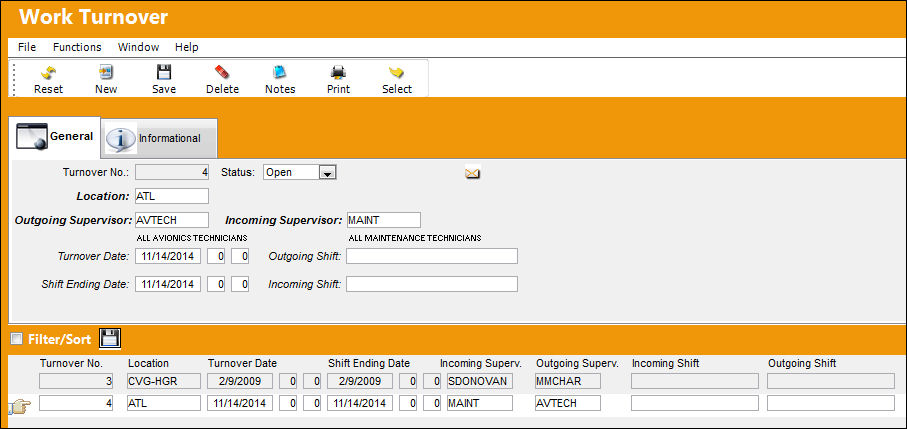
The following information/options are available in this window:
_____________________________________________________________________________________
Turnover No
Ongoing identification number issued by the system, configured through Switch  WRKTOSEQ.
Status
The current status of the turnover record: open or closed.
Location
The Location for maintenance events, inventory stores, orders, transactions, or training events.
Outgoing Supervisor
Shift leader that is ending the shift and creating the turnover record for the new shift leader coming in.
Incoming Supervisor
The shift leader coming in and taking over the work assigned in the record. He/she is the person responsible for closing performed records.
Turnover Date
Date and time of the work turnover.
Outgoing Shift 
The outgoing shift that is leaving and therefore turning over their work to the incoming shift. This code is set up in via Settings/ Explorer/ System Transaction Code/ Production/ Incoming/Outgoing Shift.
Shift Ending Date
End date and time of the shift.
Incoming Shift
The incoming shift that is coming and accepting the work from the outgoing shift. This code is set up in via Settings/ Explorer/ System Transaction Code/ Production/ Incoming/Outgoing Shift.
_____________________________________________________________________________________
Share
Print
|
©1997-2026 Trax USA Corp. All rights reserved. This manual may not be copied, photocopied, reproduced, translated, or converted to any electronic or machine-readable form, in whole or in part, without prior written approval from Trax USA Corp. |
 |